Do you need a Mac mini to run AI coding agents?
Published
Summary
Most coding agent work doesn’t need a Mac, but iOS builds do. We timed cloud Xcode and found when a Mac mini gets cheaper: past 4 to 6 hours of builds a month.
This year, people bought Mac minis to run AI agents around the clock faster than Apple could make them. OpenClaw, the open-source personal assistant that used to be called Clawdbot, set off most of it. In April, the $599 base model was sold out on Apple's US store and reselling on eBay for $715 to $795. In May, Decrypt reported waits of 16 to 18 weeks for 64 GB models, and Tim Cook said the shortage could last "several months."
Our recommendation is to run coding agents in the cloud and buy a Mac mini only for the part of the work that needs a Mac: building and testing iOS and macOS apps. Even then, buy one only if you build enough. At the prices we checked, a Mac mini costs less than cloud Xcode once you use more than 255 to 380 minutes of build and simulator time a month, depending on whether you pay it off over three years or two.
How we tested
An agent in a Replicas workspace researched, tested, and drafted this guide on November 2, 2026, without a Mac. It ran two things. The first was three agent tasks that automations started at 2:00 AM UTC, each in its own cloud workspace. The second was an iOS app built, tested, and run on cloud Xcode and a cloud iOS simulator. The cost of the iOS run comes from Limrun's pricing page and Replicas' billing records. Every other price comes from the page linked next to it, checked on November 2, 2026.
Most agent work doesn't need a Mac
Claude Code and Codex send your prompts and code to a model in Anthropic's or OpenAI's data centers. The machine they run on edits files, runs commands, and waits for the model, so it needs a shell, your repository, and enough memory to build and test your project. That covers writing code, opening pull requests, running tests, web and backend work, and Android apps, which build on Linux and run on cloud Android emulators. None of it needs Apple hardware.
A cloud workspace does all of that with no machine to buy or keep running. Each task gets its own isolated virtual machine, so agents can work in parallel without sharing ports or databases. Automations start them on a schedule while your laptop is closed. You pay only while a workspace is awake: $0.004 a minute for the small size (2 vCPU, 8 GB), and the $50 Developer plan includes about 208 hours of that a month. A workspace sleeps after 30 minutes without activity.
Three agents at 2 AM
We gave three report-only jobs on our main repository to one-time automations set for 2:00 AM UTC, each in a new small workspace. This is the first one. The other two differ only in name and prompt:
| Task | Agent finished | What it reported | Billed |
|---|---|---|---|
| Check every link in our resource guides | 2:02:30 | 155 links checked: one vendor page now returns a 404, and 8 are behind bot protection | 2 min |
| Check the web app's dependencies | 2:02:38 | Which packages are behind their latest version, and what the audit flagged | 2 min |
| Type-check and lint the web app | 2:02:11 | Both passed | 1 min |
All three fired at 2:00:03, and the agents started work by 2:00:31. They ran side by side in separate VMs, and each workspace went to sleep within 3 seconds of its agent finishing. Replicas billed 5 workspace minutes in total, which is $0.02 at the included rate. Claude Code estimated the model usage at $2.14 at API prices, which you'd pay wherever the agent ran. For a job that runs every night, swap --at for --trigger-cron "0 2 * * *".
If you'd rather run agents on a server you look after yourself, any always-on Linux machine works too, such as a $24-a-month droplet with 2 vCPUs and 4 GiB. Our guide to running Claude Code and Codex off your laptop times that setup with tmux.
iOS builds are where a Mac matters
The iOS SDK ships with Xcode, and Xcode only runs on macOS. Since April 28, 2026, apps uploaded to App Store Connect must be built with Xcode 26 or later. So an agent working on an iOS app needs a Mac somewhere.
It doesn't have to be yours. Every Replicas workspace can use cloud Xcode sandboxes and iOS simulators from Limrun through the lim CLI. We've written up a longer iOS build from Linux. For this guide, we timed a short session on a small SwiftUI app that splits a restaurant bill and has two unit tests. Two commands did all the work:
| Step | Time |
|---|---|
| First build, on a new Xcode sandbox | 10.0 s |
| Rebuild after a one-line change | 2.7 s |
| Create a simulator, then build and run the tests on it | 14.6 s |
| Build, then install on that simulator | 3.1 s |
The simulator caught a bug the tests didn't. The total showed "US$ 33,24", because the simulator's region writes currency the European way, and SwiftUI's Text applies the screen's locale over the one set in the format. Setting the locale on the view fixed it, and the rebuild and reinstall took 3.8 seconds.
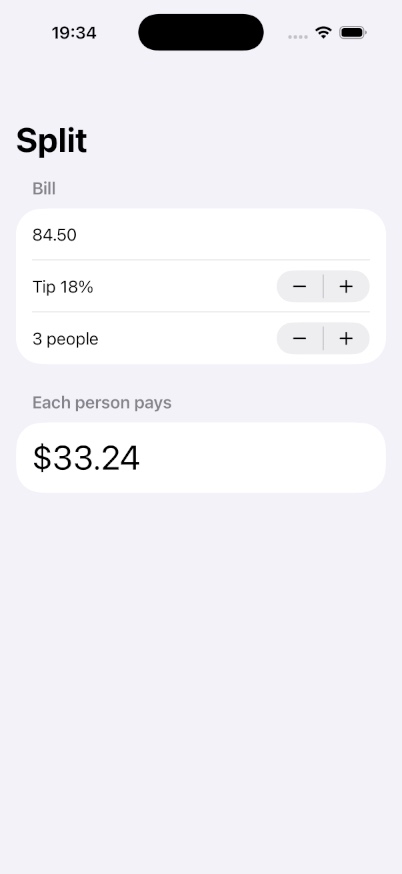
The Xcode sandbox existed for 112 seconds and the simulator for 93, from creation to deletion. At the rate below, that's at most $0.40, even counting every second as building and rounding each up to whole minutes.
When a Mac mini costs less than cloud Xcode
Prices checked November 2, 2026
Monthly cost of iOS builds and simulators
Cloud: $0.10 per build or simulator minute
Mac mini: $899, plus electricity at idle
$12 in the cloud
$63 in the cloud
Build and simulator minutes a month
Off the chart: All-day iOS work (8 hours each workday) is 10,080 minutes, or $1,008 a month in the cloud.
Cloud. Limrun's pricing is in credits: 2 a minute for an iOS simulator or an Xcode build, and 0.4 a minute while an Xcode sandbox sits warm between builds. Replicas bills mobile testing at cost as part of your usage, which our billing records show is $0.05 a credit. That makes each minute of building or simulator time $0.10, and each warm minute $0.02. Buying from Limrun directly, the Entry plan is $20 a month for 500 credits, or $0.08 a minute, and $0.10 a minute past that.
Mac mini. The base model is now an M6 with 16 GB of memory and 256 GB of storage, for $899 from Apple. Apple measures it at 4 W idle and 70 W at full load. At the EIA's 2026 average of 18.19 cents per kWh, idling around the clock costs about $0.53 a month, and a few hours of builds add pennies. Paid off over three years, the Mac mini costs $25.50 a month. Over two years, it's $37.99.
Break-even. Divide those by $0.10, and the Mac mini is cheaper past 255 minutes of build and simulator time a month if you keep it three years, or 380 if you keep it two. That's roughly 4 to 6 hours.
| Example | Cloud cost a month | Cheaper option |
|---|---|---|
| Occasional builds, 2 hours a month | $12 | Cloud |
| Daily builds, 30 minutes each workday | $63 | Mac mini |
| All-day iOS work, 8 hours each workday | $1,008 | Mac mini, by far |
The examples assume 21 workdays a month. Warm sandbox time between builds adds $0.02 a minute in the cloud. Simulators are deleted after 3 idle minutes and Xcode sandboxes after 10, by default.
The Mac mini's price leaves out your time. To build on it while you're away, you set it up as a small server and look after it:
- Turn on Prevent automatic sleeping when the display is off, and set Start up when power is connected to Always, so it comes back after a power cut. That setting needs macOS 26.5 or later.
- Turn on Remote Login to reach it over SSH, and add Tailscale or a VPN to reach it from outside your home. If FileVault is on, a restart stops at the password screen. On Apple silicon with macOS 26 or later, you can unlock it over SSH.
- Keep macOS and Xcode current. Xcode 27 needs macOS Tahoe 26.6 or later, and App Store uploads already need Xcode 26.
Cloud Xcode has its own limits. Replicas allows 3 active Limrun instances per workspace, each for up to 3 hours. A simulator isn't a phone, so test on a real device before a release. You need an Apple Developer Program membership to sign and ship either way. A Mac on your desk also gives you Xcode's editor, SwiftUI previews, and Instruments, which a cloud sandbox doesn't.
Other reasons to buy a Mac mini
Local models. A Mac mini's memory is shared by the CPU and GPU, and Apple's Mac mini page says more of it "means faster real-time rendering and faster AI token generation." The M6 goes up to 32 GB ($1,799 with 1 TB of storage), and the M5 Pro up to 64 GB ($3,199). A model on your desk has no per-token bill.
iMessage and other Apple apps. OpenClaw's iMessage docs say to run it on "the same signed-in macOS Messages host." OpenClaw itself runs on macOS, Linux, or Windows, so you only need the Mac for Apple's apps.
Keeping data at home. Your repositories and any local models stay on hardware you own. Prompts sent to a cloud model leave the house either way.
What we recommend
| Your iOS work | Setup |
|---|---|
| None: web, backend, or Android | Cloud workspaces |
| Occasional builds, under about 4 hours a month | Cloud workspaces, with cloud Xcode for the builds |
| Daily builds | A Mac mini for your iOS builds, and cloud workspaces for everything else |
| All-day iOS development | A Mac for each iOS developer, and cloud workspaces for everything else |
If you want to try the cloud half first, Replicas' free trial includes $100 of usage with no card required.