How to test iOS and Android apps with cloud coding agents
Published October 21, 2026
Summary
Cloud coding agents run on Linux, and the iOS Simulator needs a Mac. Here are the options, what they cost, and a real run where an agent caught a 100x bug.
We asked a coding agent to build a small app that splits a restaurant bill. It took a few minutes, the code type-checked, and the first UI test passed on Android.
Then a second agent tapped 8 4 , 6 0 on an iPhone simulator's keypad, and the app said a $84.60 dinner for three cost $3,384.00 each.
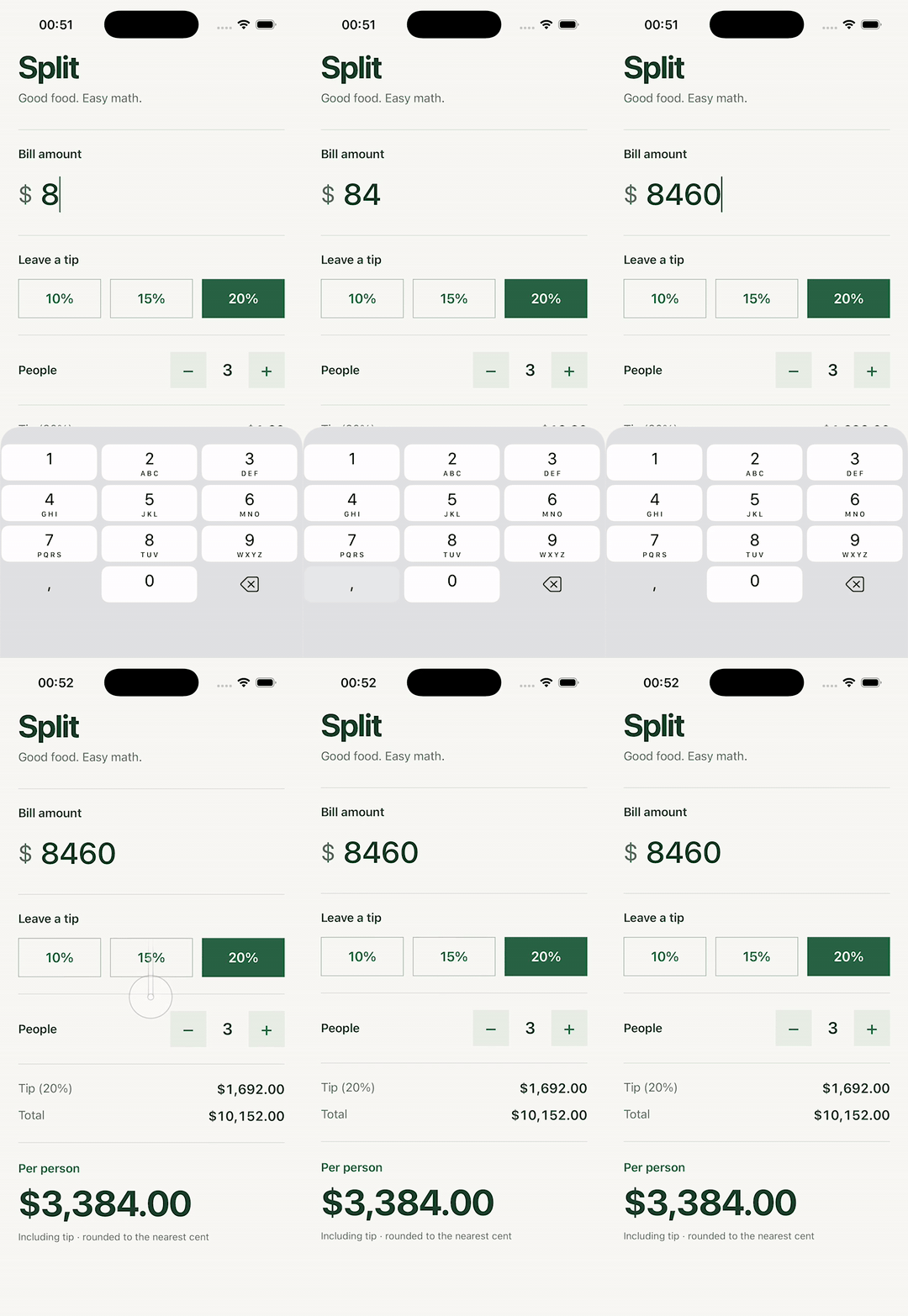
The agent only found that because it could run the app on a simulator and tap it the way a person would. When the agent lives in a cloud VM, getting it a simulator takes some work. Below are the reasons, the options and what they cost, and the full run with commands and timings.
Why a cloud agent can't just open a simulator
Cloud coding agents run on Linux VMs, ours included. That rules out the two things you'd normally reach for.
iOS. The Simulator, simctl, and xcodebuild only ship with Xcode, and Xcode only runs on macOS. Apple's macOS license forbids running macOS "on any non-Apple-branded computer", and Macs leased for development must be rented for "a minimum period of twenty-four (24) consecutive hours". That's why EC2 Mac instances and Scaleway's Mac minis have a 24-hour minimum. There is no way to start an iOS simulator inside a Linux sandbox.
Android. The Android emulator runs on Linux, but it needs KVM for hardware acceleration. Google's docs say you can't run an accelerated emulator inside another VM, and that without acceleration it translates machine code "block by block", which "can be quite slow". Here's the workspace this guide was written from:
Some machines do expose KVM. GitHub's hosted Linux runners support it, and AWS added nested virtualization on regular EC2 instances in February 2026, naming mobile emulators as a use case. Most agent sandboxes don't.
So the device has to run somewhere else, and the agent needs a way to build, install, tap, and read the screen from where it is.
The options
| Option | Devices | Driven by | List price | Best for |
|---|---|---|---|---|
| Limrun | Simulators, emulators, cloud Xcode | lim CLI, MCP | $0.08/min iOS, $0.04/min Android | Live agent sessions |
| BrowserStack | Real devices | Appium, Maestro, MCP | $199/mo per parallel test | Real-device coverage |
| Sauce Labs | Real and virtual | Appium, saucectl | $149/mo virtual, $199/mo real | Both from one vendor |
| AWS Device Farm | Real devices | AWS API, Appium | $0.17 per device minute | Real devices by the minute |
| Firebase Test Lab | Android virtual and real, iOS real | gcloud | $1/hr virtual, $5/hr real | Shuts down September 30, 2027 |
| Maestro Cloud | Simulators, emulators | maestro cloud, MCP | $250 per device per month | Existing Maestro suites |
| Expo EAS | Simulators, emulators | eas CLI, Maestro jobs (alpha) | $2 to $4 per iOS build | CI for Expo apps |
| macOS CI | Whatever you install | Your CI | $0.062/min on GitHub | Batch builds and tests |
| Emulator with KVM | Android emulators | adb | Your VM bill | Android, with /dev/kvm |
List prices as of October 21, 2026. Limrun's per-minute rates use the credits included in its paid plans, which start at $20/mo. BrowserStack and Sauce Labs prices are billed annually, Firebase charges after a free daily quota, and GitHub's Linux runners cost $0.006/min against $0.062 for macOS.
The biggest split in this table is whether the agent gets a live device or a test report. Device clouds and CI take a build and a test suite, then send results back minutes later. That's the right shape for regression suites and release checks. An agent fixing a bug needs a device it can tap, read, and check again in seconds, many times in a row. Limrun is built for the second shape, and Expo has cloud simulators for agents in a limited preview.
Simulators and emulators aren't phones. Limrun's own docs say so: they "do not reproduce real GPU behavior, thermal throttling, cellular conditions, or battery drain". Before a release, run on real hardware, either a real-device cloud or a phone on your desk.
If your agent runs on your own Mac, you don't need any of this. Local tools like MobileBuildMCP (formerly XcodeBuildMCP) and mobile-mcp hand it the local simulator. This guide is about agents that run in the cloud.
The full run
Agents did everything below in one Replicas workspace: Linux, 8 vCPUs, no KVM. Replicas includes Limrun's lim CLI and agent skills in every workspace, already signed in. (This isn't Replicas for iOS, our app for steering agents from your phone.)
An agent builds the app
We gave Codex one prompt: build Split, a one-screen Expo SDK 58 app with a bill amount field, 10, 15, and 20% tip buttons, a people counter, and a per-person total. Add test IDs. Don't run it on a device. It finished, tsc --noEmit passed, and it committed.
Then a second agent, Claude Code, took over to build and test it.
Building without a Mac
For iOS, lim xcode build syncs the project to a Mac in Limrun's cloud, runs expo prebuild, CocoaPods, and xcodebuild there, and streams the log back. Attaching a simulator installs and launches the result:
Replicas workspaces don't include Limrun's Gradle sandboxes. Building an APK doesn't need KVM though, so the agent installed JDK 17 and the Android command-line tools, built it on the workspace, and sent it to a cloud emulator:
| Step | Time |
|---|---|
| iOS build on cloud Xcode, first run | 132 s |
| iOS build after a two-line change | 15 s |
| iOS simulator created, app installed and launched | 2.0 s |
| Android APK build on the workspace, first run | 342 s |
| Android APK build after the change | 31 s |
| Android emulator ready | 1.95 s |
| 68 MB APK uploaded and installed | 4.8 s |
The first builds include installing npm packages, downloading Gradle, and installing CocoaPods. The 15-second iOS rebuild synced 8.4 KB.
Driving it like a person
On iOS, the agent drove the simulator with lim ios commands. It reads the accessibility tree to find elements by test ID, then taps, types, and takes screenshots:
That worked: $101.52 total, $33.84 each. The screenshot showed what the tree didn't. The keypad's decimal key was a comma.
The simulator's region was set to the Netherlands (en_US@rg=nlzzzz), so its number pad shows a comma, like it does for people in much of Europe and South America. lim ios type sends key presses straight to the field, so it never touched the on-screen keypad. When the agent tapped the real keys instead, 8 4 , 6 0 came out as 8460.
The input check the first agent wrote only accepts a period:
The comma is rejected, so it silently disappears, and the next digits keep going. Nothing crashes and nothing looks broken. The total is just 100 times too high.
The accessibility tree caught a smaller bug too. VoiceOver would read the people count as "1 people".
A test that passes, and one that doesn't
Limrun runs Maestro on iOS simulators with lim ios maestro, and its docs point Android users to Appium over the adb tunnel. We tried stock Maestro over that tunnel instead, and it worked unchanged. lim android connect prints the tunnel address, which Maestro takes as the device:
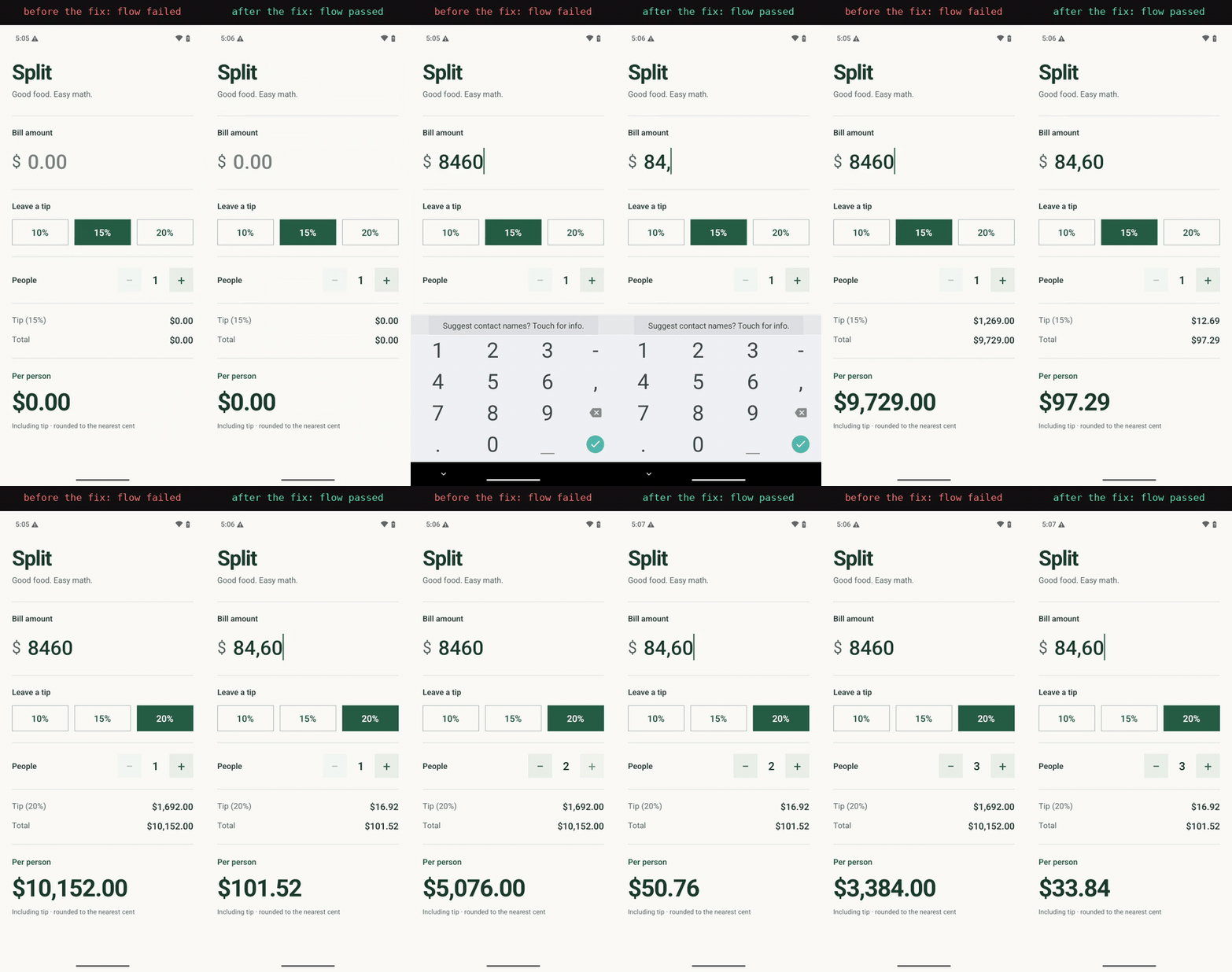
The first flow types 84.60, picks 20%, adds two people, and checks both totals. All 11 steps passed, and the whole command took 36 seconds. That's a green check for an app that gives a lot of its users the wrong total.
The second flow is the same with a comma:
It failed on the total, with $10,152.00 on screen:
Fix, rebuild, test again
The fix accepts either separator and converts before doing math:
It also makes the label read "1 person". After the 15 and 31 second rebuilds, both Maestro flows passed on Android, 2 of 2 in 59 seconds, and the same five taps on the iOS keypad gave $33.84. lim ios maestro test .maestro/ ran the same two flows on the iOS simulator. They passed 2 of 2 in 45 seconds after one change: the people check now also accepts "3 people", because Maestro on iOS matches the accessibility label, not the visible text.
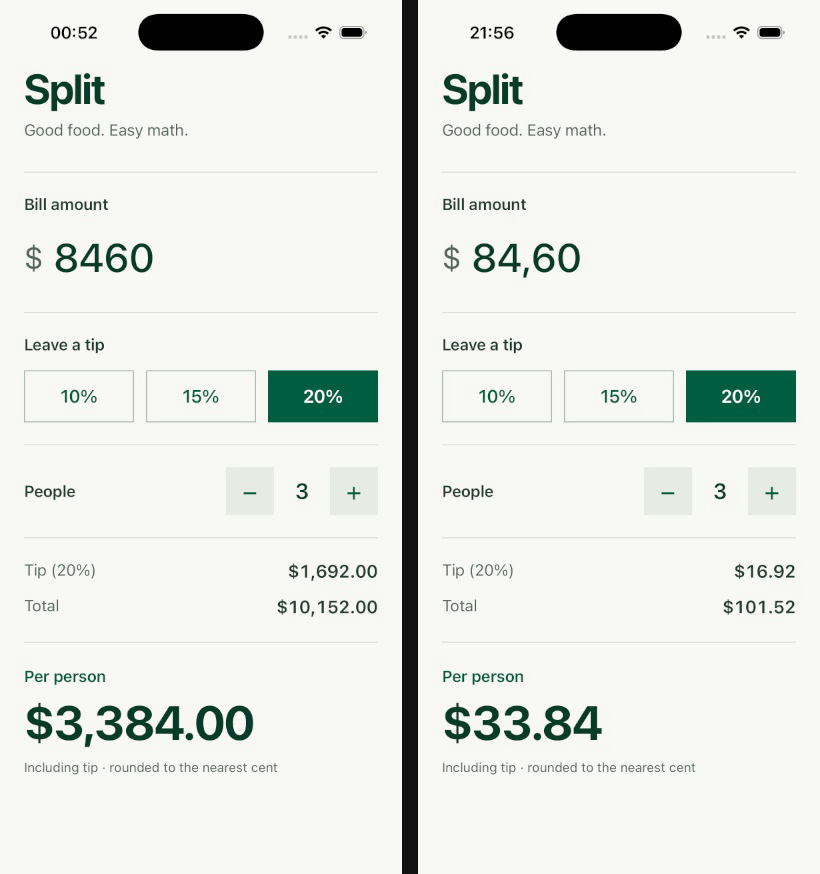
The first Android reinstall went wrong. It uploaded the new APK under the same file name, and the emulator kept running the old build. The agent only noticed because the people count still read "1 people" in the UI tree. Installing with adb install -r over the tunnel fixed it. Before an agent trusts a test result, have it confirm that something it just changed is actually on the device.
Limits
Mobile testing in Replicas allows 3 active Limrun instances per workspace, and each lives at most 3 hours. Simulators and emulators are deleted after 3 idle minutes and Xcode sandboxes after 10, adjustable up to an hour with --inactivity-timeout. Instances stop when the workspace sleeps, is archived, or is deleted, and mobile testing isn't available to organizations with a signed BAA.
We hit the idle timeout once. The simulator was gone after a few minutes spent on the fix, so the next build couldn't install to it. Creating and attaching a new one took 2.4 seconds.
There are no real devices, so plan a real-device pass before a release.
Try it
Every Replicas workspace has the lim CLI and the Limrun skills ready, and a Mobile view appears next to Desktop when an agent starts a device, so you can watch it or take over. Ask an agent to build your app and test it on iOS and Android, or read the mobile testing docs.