Build a native iOS app without a Mac: a build log from Linux
Published October 24, 2026
Summary
An agent wrote a SwiftUI app on Linux, built it on cloud Xcode, fixed its own build errors, ran XCTest, and caught a crash on a simulator. Commands, timings, and what signing still needs.
We wanted to see how far a coding agent could take a native iOS app from a Linux machine, with no Mac anywhere in the loop. So we gave Claude Code one job in a Replicas workspace: write a small SwiftUI app, build it, test it, run it on an iPhone simulator, and get as close to an installable build as it could.
It got a working, tested app running on a simulator. On the way it hit two build errors, one wrong test, and one crash, and it fixed each one from the logs. Every build we timed finished in under 11 seconds. The one thing it couldn't do was sign the app for a real iPhone, because that takes an Apple account.
The starting point: Linux, and no Swift compiler
The workspace was an x86_64 Linux VM with 8 vCPUs. which swift swiftc xcodebuild printed nothing.
That's normal. An iOS app is compiled against the iOS SDK, which contains SwiftUI and UIKit, and Apple ships that SDK with Xcode. The Xcode system requirements list the SDKs bundled with each Xcode release and the macOS version it needs (macOS Tahoe 26.6 or later for Xcode 27). Swift has official Linux toolchains, but they don't include the iOS SDK. You can't run macOS in a Linux VM either: Apple's macOS license says you agree not to "install, use or run the Apple Software on any non-Apple-branded computer".
So the code has to compile on a Mac somewhere. Here it was a Mac in Limrun's cloud, reached through the lim CLI (version 0.47.0), which every Replicas workspace has installed and signed in, along with Limrun's agent skills. The agent used the limrun-xcode skill for builds and limrun-ios-simulator for driving the simulator. Claude Code ran this one. Codex or any other agent that runs shell commands can use the same CLI.
Writing the app without compiling it
The app is Pace, a running pace calculator. You enter a distance and a time, and it shows your pace per kilometer and per mile, plus predicted 5K, 10K, half marathon, and marathon times using Riegel's formula (T2 = T1 × (D2 / D1)^1.06). The agent wrote three Swift files and one XCTest file.
It didn't write an .xcodeproj. Xcode project files are long, generated, and hard to edit by hand, so it wrote a XcodeGen spec instead, and the remote sandbox generates the project before every build:
It also ran git init in the project folder. lim remembers the current sandbox and simulator per git worktree, so commands need to run from that folder. Run from a different folder, lim xcode get couldn't find the sandbox.
First build: an error in 11 seconds
With no sandbox running yet, this created one, synced 6.6 KB of source, generated the project with XcodeGen 2.46.0, and ran xcodebuild with Xcode 26.4. The log streams back to the terminal, and it ended here:
That took 11 seconds from the command to the error, including creating the sandbox. pace(...) returns nil when the distance or time is zero, and the view passed it straight into format, which takes a plain Double. The compiler suggested ?? or !. The agent unwrapped it instead, so a missing pace hides its row:
The rebuild synced 2.6 KB and succeeded in 2.8 seconds.
Tests: two failures, one of them in the test
lim xcode test builds the scheme's test targets, attaches a simulator if there isn't one, runs the tests on it, and prints a line per test. The first run didn't get that far:
The spec gave the app an Info.plist but gave the test bundle nothing. One line under PaceTests fixed it:
The second run built and ran the tests:
The agent had worked out the expected marathon time for a 50-minute 10K in its head. A failing test can mean the code is wrong or the test is wrong, so before changing anything it checked the math on its own:
The app was right and the test was wrong, so it fixed the expected value. All 5 tests passed, and the run took 4.5 seconds.
On the simulator
The test run had left a simulator attached to the sandbox, and once one is attached, every successful lim xcode build installs the app on it and relaunches it. The next build finished in 1.5 seconds and installed in 0.44 seconds.
The agent checked the screen by reading the accessibility tree, which is quicker to search than a screenshot:
Then it changed the inputs the way a person would: it tapped the distance field, deleted the old value, and typed 21.1, then did the same with 1:45:00 in the time field. The pace changed to 4:59 per km, which matches 6,300 seconds ÷ 21.1 km.
Switching to miles took a workaround. lim ios tap-element --ax-label "mi" found nothing, because the tree showed the segmented picker as a single AXTabGroup with a frame of {{250, 223.3}, {120, 31}} and no children for its two segments. The agent tapped the middle of the right half by coordinate instead:
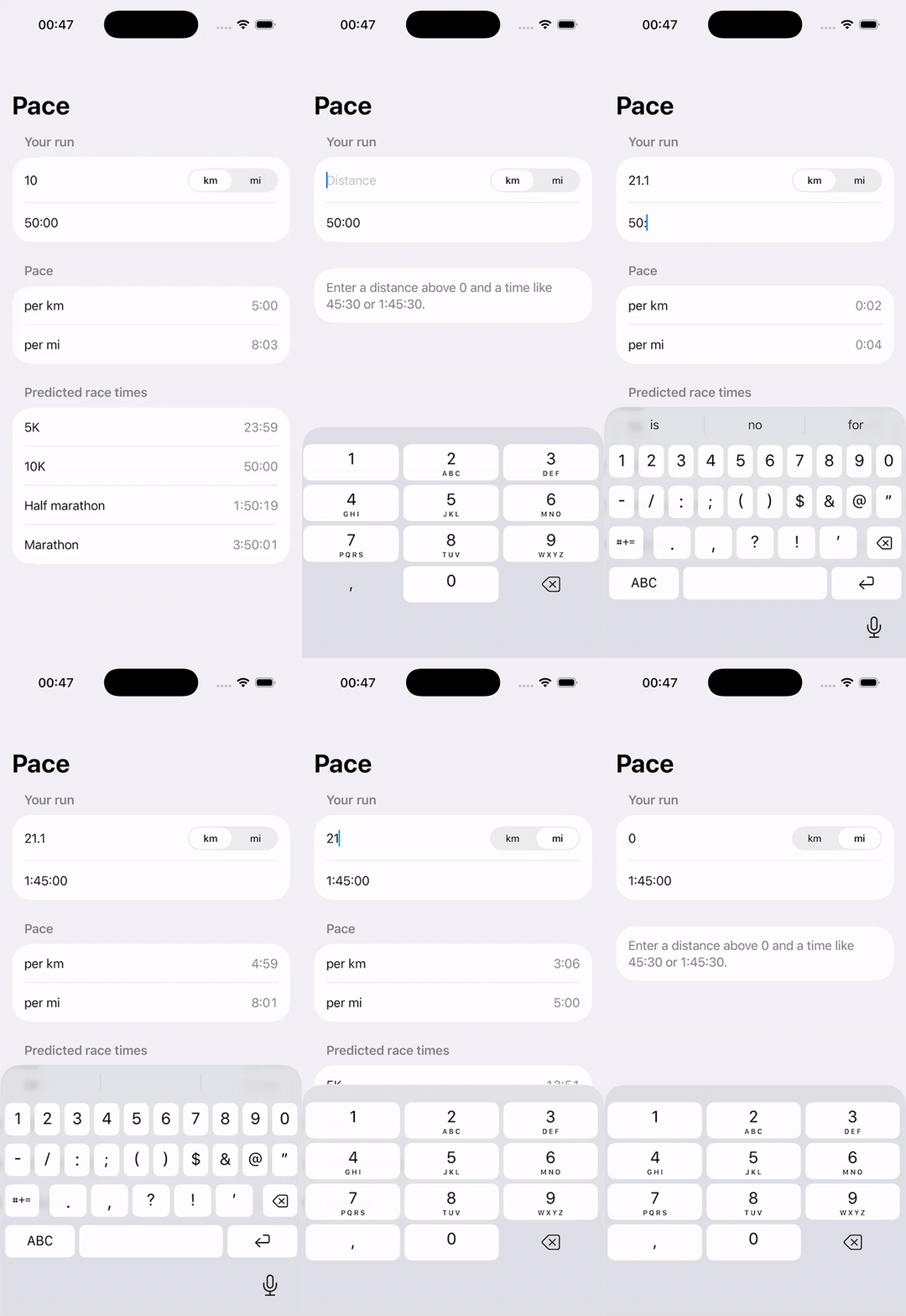
The agent recorded it with lim ios record start and lim ios record stop -o final.mp4, and we converted the video to a GIF. The last few seconds show the crash fix from the next section.
A crash the tests didn't cover
While fixing the first build error, the agent noticed that a distance of 0 would hide the pace rows but still reach the race predictions, where 5,000 ÷ 0 is infinity. It checked on the simulator before changing anything. lim ios launch-app streams the app's logs and prints a crash report if the app dies, so it launched Pace that way, typed 0 into the distance field, and got:
Frame 2 points at format, which calls Int(seconds.rounded()) on the infinite prediction. The fix moved distance parsing into PaceCalculator, where a test can reach it, and made it reject zero and negative values:
A new test covers "0", "-5", "", and "21,1". All 6 tests passed in 4.4 seconds. On the simulator, typing 0 now shows the input hint, and launch-app reported no exit.
How long each step took
Once the app worked, we deleted the sandbox and the simulator and timed everything again from scratch, using time on the Linux side:
| Step | Time |
|---|---|
Cold build: new sandbox, 7.3 KB synced, full xcodebuild | 9.8 s |
| Rebuild after a one-line change (2.6 KB synced) | 2.7 s |
| Rebuild with no changes | 2.1 s |
| New simulator created and attached, app installed and launched | 1.7 s |
| Test target built, 6 XCTests run on the simulator | 4.8 s |
| Unsigned Release build for a device | 4.7 s |
Pace is about 130 lines of app code with no package dependencies, so these are close to the floor. A bigger app's cold build will mostly be compile time and dependency resolution. In our mobile testing guide, an Expo app with CocoaPods took 132 seconds to build cold on the same service and 15 seconds after a two-line change.
Limrun charges $0.08 a minute for an active Xcode build and $0.016 a minute while the sandbox sits warm, at the rates included in its paid plans, which start at $20 a month (checked October 24, 2026).
Getting something you can install
There are three things you might want at the end of a run like this. The agent got the first two.
A simulator build you can hand to someone. Adding --upload to a build stores the result in Limrun's asset storage:
The second command started a fresh simulator with Pace installed in 1.45 seconds, and the agent read "Marathon, 3:50:01" from its tree. Limrun also offers a browser preview link of the form console.limrun.com/preview?asset=.... We opened it in a headless browser and got Limrun's sign-in page. Uploads from a Replicas workspace go to our Limrun account, not yours, so that link won't work for you. Simulator builds don't run on iPhones either way.
An unsigned device build. This worked without any Apple account:
The first device build, without --upload, took 4.7 seconds. With --upload, it stored a 39 KB file named pace-device.ipa. Inside were Payload/Pace.app/Info.plist, Pace, and PkgInfo, and nothing else. Running codesign -dv on the sandbox (lim xcode run runs any command there) said code object is not signed at all. No iPhone will install it. What it does show is that the app compiles for real arm64 devices.
A signed IPA or a TestFlight build. This is where the agent stopped. Asking for signing without credentials fails right away:
There were no Apple credentials in the workspace, so we didn't run any signed build. Here's what you'd need:
- An Apple Developer Program membership, $99 a year. It comes with App Store Connect and Certificates, Identifiers & Profiles, according to Apple's membership comparison. Limrun's guide says the same thing: "You still need an Apple Developer Program membership."
- An App Store Connect team API key: the key ID, the issuer ID, and the downloaded
.p8file. With it, Limrun uses Apple's cloud signing, which Apple introduced at WWDC21: "Apple creates or reuses a cloud-managed certificate and the required profiles during export," according to Limrun's signing docs. To sign for distribution, the key has to be an Admin key or have "Access to cloud-managed distribution certificates" turned on. If you already have a.p12certificate and a.mobileprovisionprofile, you can pass those instead. - For an IPA you install directly, the target iPhones must be registered to your team. Apple allows 100 devices per product family per membership year.
- For TestFlight, an app record in App Store Connect. You create it by hand, because, as Limrun's guide puts it, "Apple's API cannot create one." TestFlight then takes up to 100 internal testers and 10,000 external ones, and your first external build has to pass App Review.
With those in place, the build, signing, and upload to App Store Connect are one command. We haven't run it:
A free Apple Account can also put your own app on your own phone. Apple allows 3 devices, and the profiles expire after 7 days. That route works through Xcode's Personal Team, while Limrun's signing flags expect an App Store Connect key or your own certificate, so we didn't try it here.
The other ways to build without a Mac of your own
Each option below runs Xcode on a Mac you don't own. They differ in how you reach that Mac and what you pay. Prices were checked on October 24, 2026.
A Mac, local or rented. A Mac on your desk is the only option here with Xcode's editor, SwiftUI previews, Instruments, and an iPhone on a cable. A rented one gives you the same Xcode remotely, without the cable. An agent can run on the Mac itself: Claude Code and Codex both work in a macOS terminal and can call xcodebuild directly. MacStadium rents an M2 Mac mini for $109 a month, or an M4 for $149. AWS EC2 Mac instances run on dedicated hosts, at $0.65 an hour for M1 (mac2) and $0.878 for M2 (mac2-m2) on demand in us-east-1. They have a 24-hour minimum, so even a short session costs at least $15.60 on M1. The minimum comes from the macOS license, which says each lease "must be for a minimum period of twenty-four (24) consecutive hours."
Xcode Cloud. Apple's own CI, which works with TestFlight to send new builds to your testers. The Developer Program includes 25 compute hours a month, and more costs $49.99 a month for 100 hours, up to $3,999.99 for 10,000. Apple's docs say to "use Xcode to initially configure" a project for Xcode Cloud, so you need a Mac with Xcode at least once to set it up.
GitHub Actions macOS runners. $0.062 a minute for a standard runner, $0.102 for an M2 Pro, against $0.006 for Linux. Partial minutes round up to a full minute per job. Standard runners are free on public repositories. This fits CI on every push, and you manage signing yourself, usually with certificates stored as secrets.
Expo EAS Build. Made for Expo and React Native apps, and Expo says it's "designed to work for any native project, whether or not you use Expo and React Native." iOS builds run on Expo's macOS machines. Pricing: 15 iOS builds a month on the free plan, which warns of waits of "90+ minutes" at peak times, and $2 or $4 per iOS build beyond that, depending on worker size. EAS can generate and store your distribution certificate and provisioning profile, which needs an Apple Developer Program membership.
Codemagic. A mobile CI service with 500 free macOS M2 minutes a month for personal accounts, then $0.095 a minute for M2 or $0.114 for M4. Its native iOS guide covers fetching signing certificates with an App Store Connect API key and publishing to App Store Connect.
The CI services all work the same way: you push a commit, a fresh macOS machine runs your workflow, and you get an artifact or a test report back. That's the right shape for release builds. This run had 15 builds and test runs in a row, each started by the agent after reading the last one's output, plus taps and screenshots on a live simulator in between. That loop needs a sandbox the agent can call again within seconds, which is what lim xcode build gave it. You need the same Apple account to ship either way.
What you don't get
Replicas runs mobile testing with these limits:
- 3 active Limrun instances per workspace, each living at most 3 hours.
- Simulators are deleted after 3 idle minutes and Xcode sandboxes after 10.
--inactivity-timeoutraises either to an hour. - Instances stop when the workspace sleeps, is archived, or is deleted.
- Mobile testing isn't available to organizations with a signed BAA.
A simulator also isn't a phone. Limrun's docs say simulators "do not reproduce real GPU behavior, thermal throttling, cellular conditions, or battery drain", so test a TestFlight build on real hardware before a release. Without a Mac you also give up Xcode's editor, SwiftUI previews, and the debugger UI. The agent worked from logs, the accessibility tree, screenshots, and crash reports.
Every Replicas workspace comes with lim and the Limrun skills installed and signed in, so you can ask an agent to build and test your iOS app the way this one did. The mobile testing docs cover the setup.