How to let a cloud coding agent through your IP allowlist
Published
Summary
Cloud coding agents leave from changing, shared IP addresses. See which agents publish fixed egress IPs, how to set up a static IP, and when a VPN fits better.
Many databases and internal APIs only accept connections from IP addresses on an allowlist. A cloud coding agent runs in a sandbox whose address you don't control, so when it tries to run a migration or call your staging API, the connection is refused. To let it in, the agent's traffic has to come from a fixed address that you can put on the list.
This guide shows what a cloud agent's traffic looks like from the outside, which agents publish fixed egress IPs, how to set one up in Replicas, and when a VPN, bastion host, or private network is the better fit. Every claim about another vendor links to that vendor's own page. We checked them on November 7, 2026.
How we tested
An AI agent working in a Replicas workspace ran the tests and wrote this guide on November 7, 2026, and a person on our team reviewed it before it went live. The tests ran in four workspaces in our own organization. We already had a static egress IP turned on there, with one database host in its routed destinations, and we didn't change any organization settings for the tests. We also left our static IP address out of this page.
Why the agent's requests get refused
Tested November 7, 2026
What a service sees from a Replicas workspace, by route
Request to
Route out of the workspace
Address the service saw
Allowlist with only the static IP
Host not in Routed destinations
Route out of the workspace
Directly, from the sandbox's own address
Address the service saw
8 addresses in 54 requests from 3 workspaces, 7 of them seen in more than one workspace
Allowlist with only the static IP
Refused
Host in Routed destinations
Route out of the workspace
Through an encrypted tunnel to an exit in us-west-2
Address the service saw
1 address, the static IP, on all 61 responses from 4 workspaces
Allowlist with only the static IP
Accepted
From three of the workspaces, we sent 54 requests to ipify, a service that replies with the address a request came from. They came from 8 different addresses, and the address often changed from one request to the next inside the same workspace. Seven of the eight showed up in more than one workspace, so the addresses belong to a pool that many sandboxes share. Adding them to your allowlist wouldn't work for long, and it would also let in traffic from sandboxes that aren't yours. GitHub gives the same advice for its hosted runners, and doesn't recommend allowlisting their IP ranges for internal resources.
Then we sent 65 requests through the workspaces' static egress tunnel. All 61 that got a response came from one address, the static IP in our organization's settings. Our routed destination is a database, not ipify, so we sent these requests out the tunnel's network interface directly. That's the same path the workspace gives a host in its routed destinations, as its routing table showed. Here is one run of the commands in our first workspace:
The first route is our database host, which is in Routed destinations, and the second is api.ipify.org, which isn't. We hid our static IP, the database host, and the last two parts of each sandbox address. The four requests that got no response were sent in one workspace's first 30 seconds. We couldn't make that happen again in 22 more requests to that workspace and a fourth one, but it's a good reason to let an agent retry its first connection.
Which cloud coding agents publish fixed egress IPs
"Shared" in this table means everyone who uses that vendor's cloud agents sends traffic from the same addresses, so an allowlist entry for them trusts all of those customers, not only you. In alphabetical order:
| Agent | What the vendor publishes | Shared or only yours | Which traffic uses it | Plan |
|---|---|---|---|---|
| Claude Code on the web | Anthropic's outbound IP ranges, which its docs say to allowlist for GitHub (Anthropic) | Shared | Outbound requests such as MCP tool calls (Anthropic). The docs don't say a session's own traffic uses them | Self-hosted environments run sessions in your network, in public beta on Team and Enterprise (Anthropic) |
| Codex cloud | A JSON file of ranges, with 2,895 prefixes on November 7 (OpenAI) | Shared. OpenAI says the list identifies its network, "not a specific user or workspace" | "Connections from Codex cloud to services such as GitHub" | Not tied to a plan on that page |
| Cursor cloud agents | A JSON file of addresses, with 416 in 12 clusters on November 7 (Cursor) | Shared. Cursor says the addresses change from time to time | Cloning and pushing, packages, API calls, and web access. A separate git proxy uses fewer addresses for git only | Not stated for the list. Private connectivity is for Enterprise |
| Devin | Seven addresses and one /26 range, which "may change" (Cognition) | Shared | Used in its guide for self-hosted Git and artifact stores (Cognition). Not stated for all session traffic | That integration is for Enterprise |
| Factory | No egress IP list that we could find in Factory's docs | Not applicable | Not applicable | Factory Private runs sandboxes in your VPC, in private preview (Factory) |
| GitHub Copilot cloud agent | Static IP ranges for larger runners, when Copilot runs on GitHub Actions (GitHub) | Only yours. Each runner gets its own ranges | Everything the runner sends. Doesn't apply to sessions in a cloud sandbox (GitHub) | GitHub Enterprise Cloud |
| Ona | Runners deploy in your own AWS or GCP account, so agents leave from your network (Ona) | Only yours | Everything | Enterprise |
| Replicas | One static IP for your organization's workspaces (Replicas) | Shared with other Replicas organizations by default. A dedicated IP is available | Only the destinations you list. With a dedicated IP, you can route everything | Team and Enterprise. Traffic through a dedicated IP is $0.15 per GB |
A shared list belongs to everyone on that vendor, so keep a password or token on anything you open to it. OpenAI's page says its list doesn't replace request authentication.
Set up a static IP in Replicas
Static egress is available on paid Team and Enterprise plans. An organization admin turns it on, and it then applies to every workspace in the organization.
- Open Organization → Settings → Security and turn on Use a static IP. When provisioning finishes, the IP address shows in the same section.
- Add that address to the allowlist on your database, API, or firewall.
- Under Routed destinations, list the hosts that need the static IP, one per line. Each line can be an exact hostname, an IPv4 address, or an IPv4 CIDR range. Wildcards aren't supported, and a hostname needs an IPv4 address. If your database host is IPv6-only, list its IPv4 connection pooler instead.
- Start a new workspace, or wake a sleeping one. Workspaces pick up the list when they're created or next wake.
- Have the agent connect to the service. If it's refused, check that the host resolves to IPv4 with
getent ahostsv4 <host>, and that the workspace started after you saved the list.
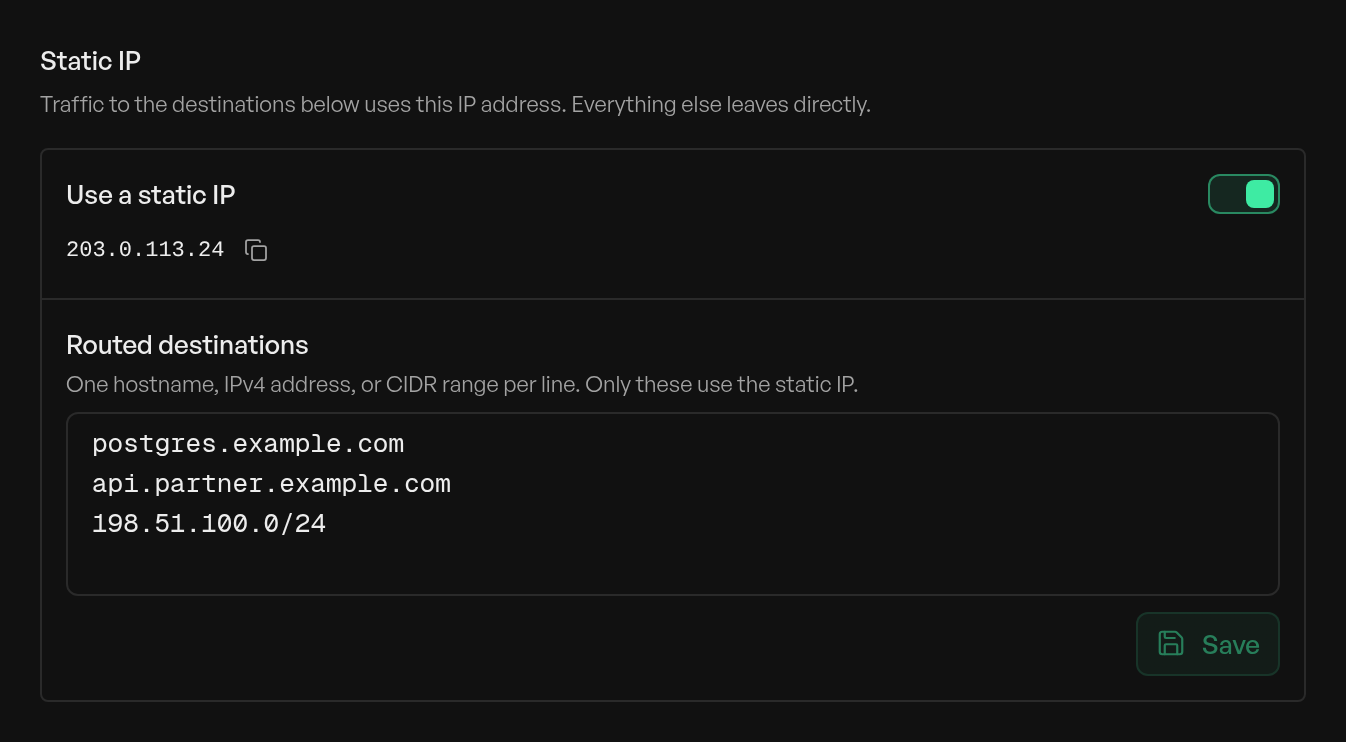
This screenshot comes from a test organization on our local development server, with an example address from the range reserved for documentation.
Hostnames are resolved inside the workspace and resolved again every minute, so a database whose address moves keeps working. Everything not on the list leaves directly, DNS included. If the tunnel stops, requests to listed hosts leave from a sandbox address, which your allowlist refuses. The static egress docs cover the rest.
Shared or dedicated IP
The main weakness of static egress in Replicas is that the IP is shared by default. Other Replicas organizations that turn on static egress leave from the same address. That keeps out the rest of the internet, but not other Replicas customers.
| Shared static IP (default) | Dedicated IP | |
|---|---|---|
| Who else leaves from it | Other Replicas organizations with static egress | No one. It's only yours |
| What your allowlist trusts | Your workspaces and theirs, so keep authentication on | Only your workspaces |
| Which traffic uses it | Only your routed destinations | Your routed destinations, or everything with Route all traffic |
| Cost | Included in Team and Enterprise | $0.15 per GB of traffic through it (billing) |
| How to get it | Turn it on in Settings → Security | Contact us |
Turn on Route all traffic only when a vendor or firewall needs every request from your workspaces to come from one address, or when the hosts that need it are too many to list. It sends package installs and browser traffic through the exit too, so those gigabytes are billed and slower.
Speed is the other cost. Traffic to a routed host goes from the workspace to the exit in Oregon (us-west-2), then on to your service, so the extra time depends on how far your service is from Oregon. Our database is on the US east coast. These are the medians we measured:
| Request | Direct | Through the static IP |
|---|---|---|
| New HTTPS connection to ipify | 43 ms | 366 ms |
| Request on an open connection to ipify | 15 ms | 153 ms |
| Round trip to our database | 14 ms | 120 ms |
For the database, we timed a TCP handshake to the host directly, and a select 1 on an open connection through the static IP.
An agent that runs one migration won't notice. An agent that runs thousands of queries one at a time will, so route only the hosts that need the IP, and keep connections open.
Other ways to reach a private service
An IP allowlist suits a managed database or a SaaS API that offers nothing else. When the service is inside your own network, one of these may fit better:
| Approach | How the agent gets in | Good fit | What you take on |
|---|---|---|---|
| Static egress IP | Its traffic leaves from an address on your allowlist | Managed databases and third-party APIs with IP allowlists | Trusting everyone who shares the address, unless it's dedicated |
| Bastion host | It opens an SSH tunnel to a jump host you run, which can reach the service | A few private databases in one VPC | Running and patching the host, and giving the agent an SSH key |
| VPN | Its workspace joins your private network | Many internal services | The agent can reach anything on that network that isn't firewalled off |
| Private connectivity | A connector in your network dials out to the vendor, or you use AWS PrivateLink. Devin Connect and Cursor's private connectivity work this way | Enterprise teams with internal Git, registries, or APIs | A vendor-specific setup, usually on an enterprise plan |
| Agents in your own network | Sessions run on machines you operate, such as Claude Code self-hosted environments or Copilot on self-hosted runners | Strict compliance rules | Operating the machines, the images, and their updates |
An allowlist only checks where traffic comes from, so also give the agent a database user or API token limited to what it needs. Then a mistake stays inside what that user can do. Our security page covers how Replicas isolates workspaces, and you can ask for a dedicated IP from the Enterprise page.