Debugging an Android app crash with a coding agent on a cloud emulator
Published October 24, 2026
Summary
A coding agent took a one-line Android bug report to a tested fix in under 10 minutes on a cloud emulator. The commands, timings, stack trace, and mistakes.
This is the bug report we gave Claude Code:
App closes when I open Ask
Since updating to 1.4 the app closes as soon as I tap the Ask tab. Top and Show work fine. Pixel 8, Android 15. Reinstalling didn't help.
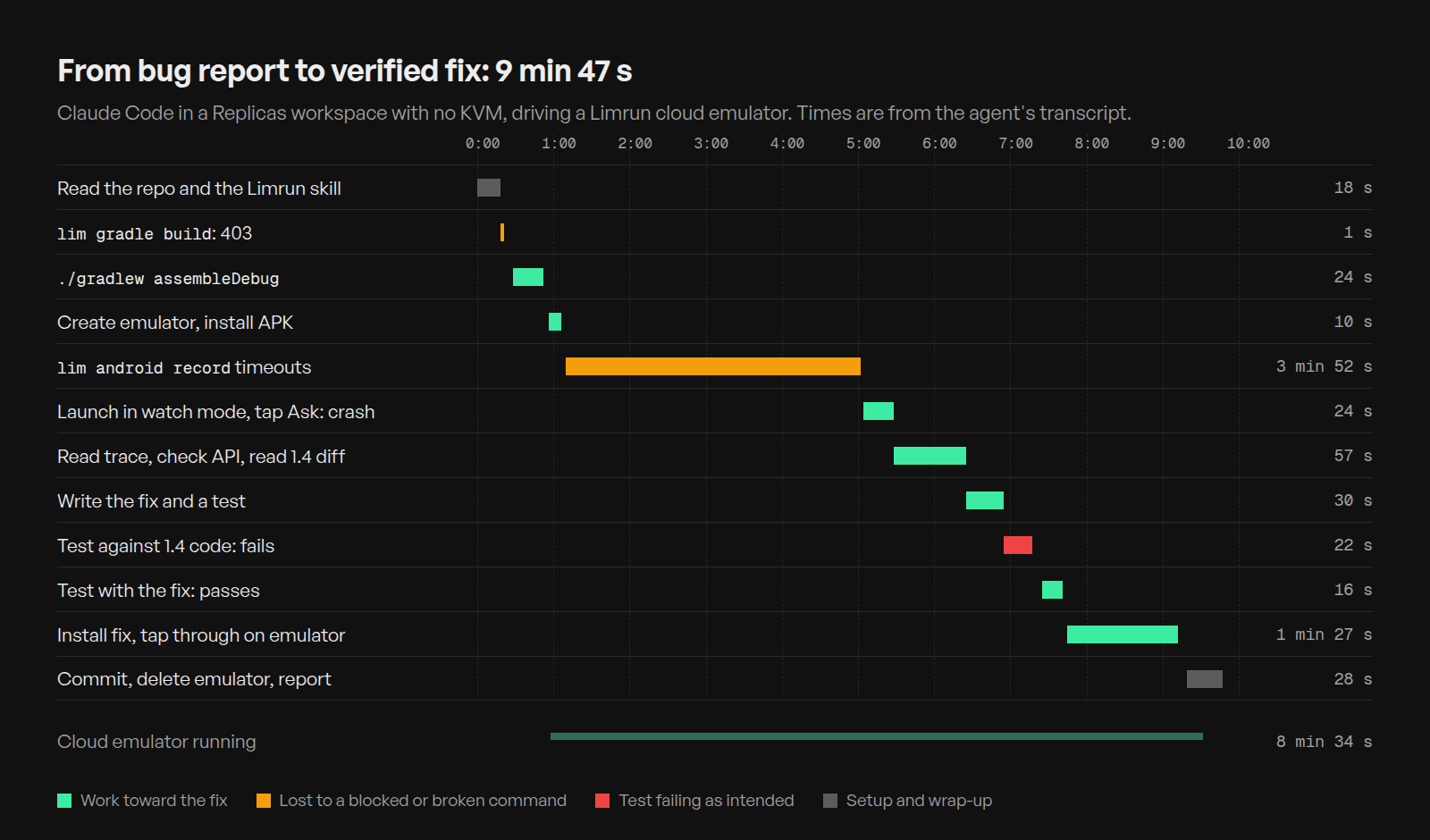
9 minutes and 47 seconds later, it had reproduced the crash on a cloud Android emulator, found the line, fixed it, written a test that fails without the fix, and checked the fixed build on the same emulator. Almost 4 of those minutes went to a recording command that never worked.
We wrote the app and planted the bug for this test. The agent got the report and the repo, and nothing else.
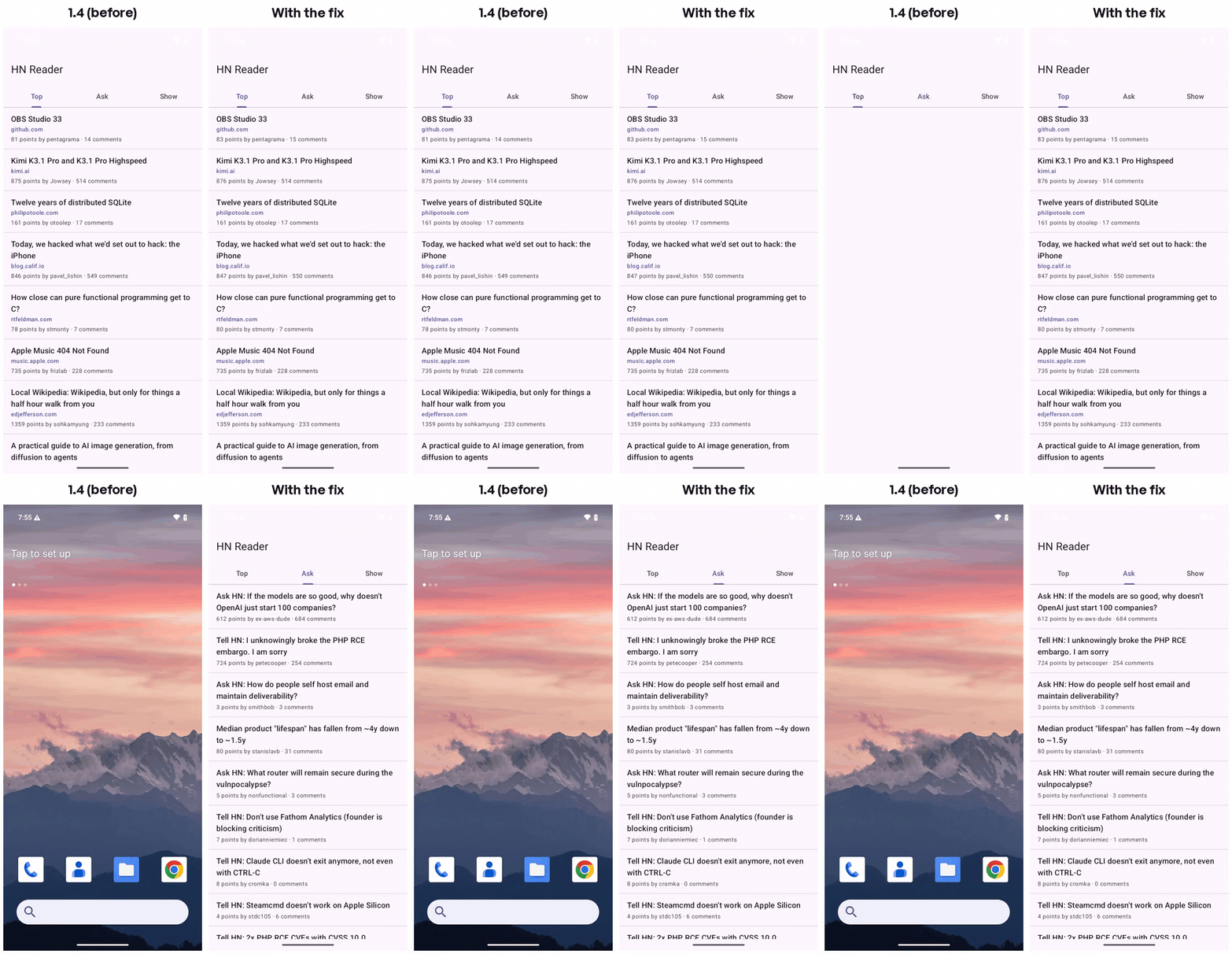
The agent's own recordings of both runs: version 1.4 and with the fix.
The app and the setup
HN Reader is a 184-line Kotlin app for the Hacker News API, with Top, Ask, and Show tabs. It uses Retrofit and Gson for network calls and a RecyclerView for the list. Version 1.4 added two things: each story shows its site, like github.com, under the title, and tapping a story opens the article instead of the comments.
The agent was Claude Code on Opus 5.5, in a Replicas workspace: Linux, 8 vCPUs, and no /dev/kvm, so no local emulator. The mobile testing guide explains why most cloud sandboxes can't run one. Its prompt was the bug report plus:
Reproduce it on a cloud Android emulator (the
limCLI is already set up in this workspace; the limrun skills explain how to use it), find the cause, fix it, and confirm the fix on the emulator. Add a test or a repeatable repro so this doesn't come back. Commit the fix to the repo.
We had installed JDK 17 and the Android SDK command-line tools beforehand, which took 18 seconds, and built the app while writing it, so Gradle's dependency cache was warm. Every time below comes from the agent's transcript, counted from when it got the prompt.
The build (0:18)
The Limrun Gradle skill tells agents to build with lim gradle build, which runs Gradle on a remote sandbox. The agent tried that first:
Replicas gives each workspace scoped access to simulators, emulators, and Xcode sandboxes, but not to Limrun's Gradle sandboxes. Building an APK doesn't need KVM, though, and the SDK was installed, so the agent ran ./gradlew assembleDebug on the workspace. It took 24 seconds.
An emulator, then a dead end (0:56)
lim android create returned in about a second (the CLI reported 0.6 seconds), the 6.4 MB APK was sent in 3.7 seconds, and the emulator reported Android 15, the version in the bug report.
Next, the agent tried to start a screen recording for its write-up. lim android record start failed after 30 seconds with Error: Request startRecordingSession timed out. It tried again, tried once without the CLI's background daemon, and ran record stop once, which hung for two minutes until the agent killed it. Recording requests go from the CLI straight to the emulator's host, not through Replicas. After the run, the same command timed out twice more on a new emulator, so this looks like a problem on Limrun's side.
After 3 minutes and 52 seconds, the agent switched to Android's own screenrecord, which runs on the device and needs no adb tunnel. It started a 40-second recording in the background, reproduced the bug, and then pulled the file:
The crash (5:20)
Without --detach, lim android launch-app watches the app until it exits, then prints why, with the stack trace and the app's recent logs. The agent started it in the background, waited for the Top list to load, and tapped Ask by its label:
In the recording, the app shows a loading spinner and is gone about a second after the tap. The watcher's output, trimmed:
None of this needed an adb tunnel.
Why a non-null String was null (5:28)
Line 23 of StoryAdapter.kt was new in 1.4:
The same release added val url: String to the Story model. Kotlin says that can't be null. Three things made it null anyway:
- The API leaves
urlout of text posts. The Hacker News API marks onlyidas required, and its example Ask HN item hastextand nourl. The agent checked the live feeds withcurl: 29 of the first 30 Ask items had nourl, and all 30 Top items had one. That's why Top and Show worked. - Gson skips Kotlin's null checks. When a class has no no-argument constructor, Gson creates it through
Unsafewithout running the constructor, so the missing field stays null. Gson's README says Kotlin's non-null types "are not supported" and that this "can lead to confusing and incorrect behavior." - The null travels until something uses it.
Uri.parsethrowsNullPointerException("uriString")on null input, which isUri.java:505in the trace. Kotlin's docs list "issues caused by external Java code" among the few ways Kotlin code can still hit a NullPointerException.
The agent read the 1.4 commit with git show HEAD and changed the click handler too, since the handler passed the same story.url to Uri.parse. Fixing only line 23 would have moved the crash from opening Ask to tapping an Ask post.
The fix (6:25)
The diffs are trimmed. Text posts hide the site line, and tapping one opens its discussion page, which is what every tap did before 1.4.
A sturdier fix is to stop parsing Kotlin models with Gson. Gson's README points Android apps to Kotlin Serialization, where "an object can be deserialized only when all its properties are present in the input" unless the property has a default. A missing url would fail at parse time instead of crashing a screen later. That's a bigger change than this bug needed, and the agent didn't make it.
A test that fails first (6:55)
The agent wrote an instrumented test that parses an Ask-style item with Gson, as the app does, and binds it through the real adapter:
Instrumented tests need a device. lim android connect opened an adb tunnel to the cloud emulator on 127.0.0.1:34253, and Gradle ran the tests over it. Before trusting the test, the agent stashed its fix and ran it against the 1.4 code:
The run against 1.4 took 22 seconds, and 1 of the 2 tests failed with the same NullPointerException: uriString. With the fix, both tests passed and the new APK built in 16 seconds.
The agent set ANDROID_SERIAL because adb also listed a second emulator, one we were running on the workspace for a separate test. The adb docs say to name the target when more than one device is attached. The test results list one device, limdroid_x86_64_only - 15, which is the cloud emulator.
Checking it on the emulator (7:45)
The agent installed the fixed APK and read lastUpdateTime from dumpsys package to confirm the new build was on the emulator. Then it repeated the report's steps with screenrecord running: open the app, wait for Top, tap Ask. The Ask list rendered. It switched tabs, tapped an Ask post, and confirmed that Chrome came to the front showing news.ycombinator.com/item?id=50200997. The watcher ended with reason: terminated, which was the agent stopping the app, not a crash.
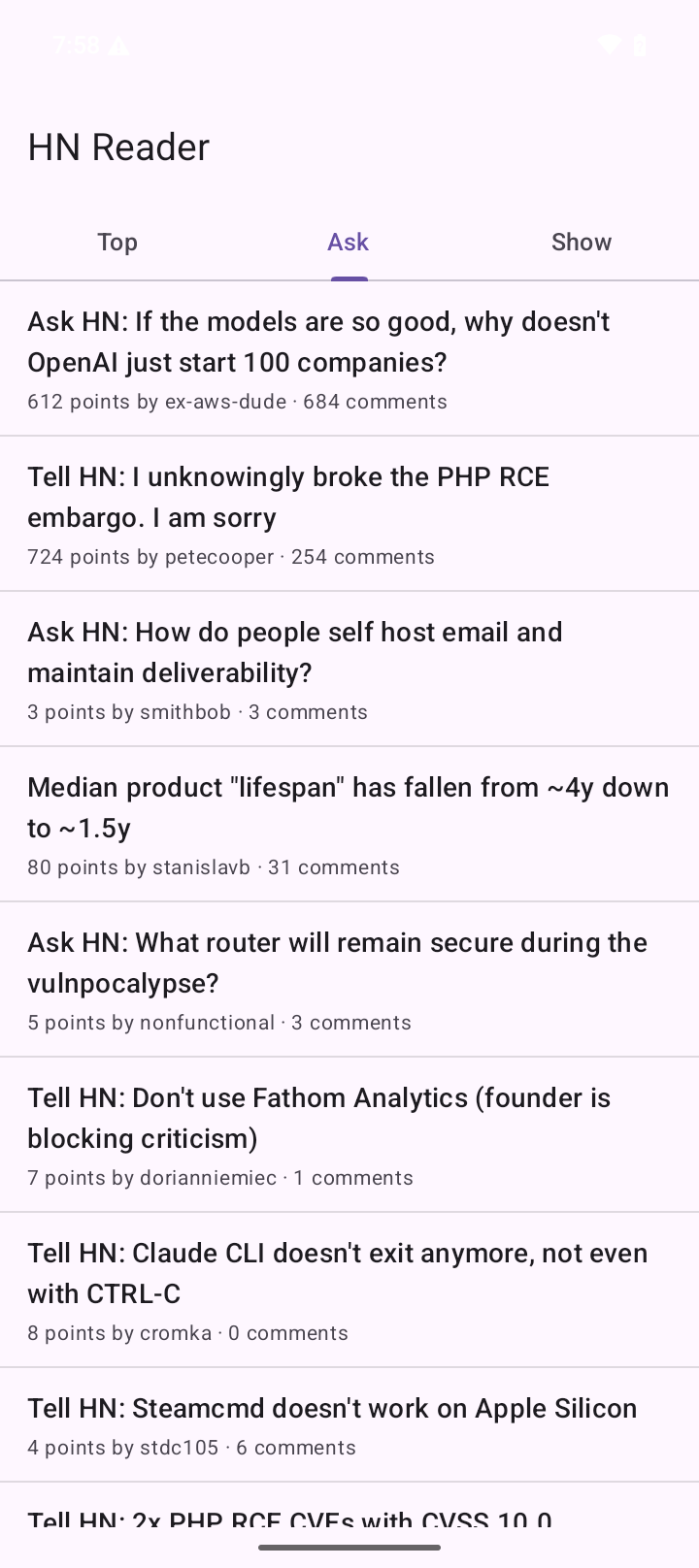
It committed the fix and the test, deleted the emulator, and reported back at 9:47.
What the agent got wrong
- It lost 3 minutes and 52 seconds to recording. Three
record starttimeouts and onerecord stopthat hung for two minutes came before it triedscreenrecord. Switching after the first timeout would have saved most of that. - It pulled the first video too early, while
screenrecordwas still writing it, and had to pull it again. - It got the theme name wrong in the test,
Theme_HNReaderinstead ofTheme_HnReader, and caught it with a grep before the first build. - It built locally against the skill's advice. The Limrun skill says not to use a local SDK. With
lim gradleblocked, that was the only way to build, and the agent said so in its summary.
It also left a nearby crash alone, on purpose. StoriesViewModel only catches IOException, so an HTTP error or a deleted item, which the API returns as null, would still crash the app on any tab. The agent flagged that in its summary instead of widening the fix, which is the right call for a bug fix.
Other ways to give an agent an Android emulator
The agent used a Limrun emulator because the workspace has no KVM. These are the other common setups, with prices checked on October 24, 2026.
| Setup | KVM on your side | Price |
|---|---|---|
| Android Studio on your machine | Yes, or the OS hypervisor | Free |
| Cloud VM with nested virtualization | Yes | $0.187/hr (AWS c8i.xlarge) |
| docker-android | Yes | Free; Android 15+ for sponsors |
| Firebase Test Lab | No | $1/hr virtual, $5/hr physical |
| Genymotion SaaS | No | $0.06/min |
| Limrun, used here | No | $0.04/min |
Your own machine. Android Studio's emulator is free and fast with hardware acceleration: KVM on Linux, the Hypervisor Framework on macOS, and WHPX on Windows. If Claude Code or Codex runs on your laptop, it can drive that emulator with plain adb, and you need none of the rest. It doesn't help an agent running in a cloud sandbox.
A cloud VM with nested virtualization. Google Compute Engine supports it, except on E2, memory-optimized, Arm, and AMD machine types other than N4D, and warns of "a 10% or greater decrease in performance" for CPU-bound work. AWS added it on C8i, M8i, and R8i instances in February 2026. A c8i.xlarge, with 4 vCPUs and 8 GiB, is $0.18742 an hour on demand in us-east-1. You install, patch, and expose the emulator yourself.
docker-android. budtmo/docker-android packages the emulator with a browser viewer and Appium. Its README says it runs on Ubuntu hosts only, and its quick start passes --device /dev/kvm. The free images go up to Android 14; Android 15 and later are in a Pro version for GitHub sponsors. We tried the free Android 14 image on this workspace. With the documented flag, Docker refused to start it: error gathering device information while adding custom device "/dev/kvm": no such file or directory. Without the flag, the container started and the emulator exited with RuntimeError: /dev/kvm cannot be found!.
The emulator without acceleration. On the same workspace, the x86_64 emulator refused to start: ERROR | x86_64 emulation currently requires hardware acceleration!. With -accel off, it starts on QEMU's software CPU instead. Booting took about 47 minutes on this 8-vCPU workspace, which was also running other work for part of that time. Installing the 6.4 MB APK took 2 minutes 7 seconds, and the app took 1 minute 22 seconds to draw its first frame. Android then showed "Process system isn't responding" and "Settings isn't responding" dialogs, and the app's first API call failed with Unable to resolve host. We stopped there.
Firebase Test Lab. You upload an APK, and Google runs it on its devices. A Robo test explores the app without a written test, and results include "test logs, screenshots, and videos". It costs $1 per virtual-device hour and $5 per physical-device hour, billed by the minute after a free daily quota. Test Lab is deprecated and shuts down on September 30, 2027. Google points users to Developer Device Platform, in preview since August 2026, which streams physical devices and has its own agent skill. Test Lab sends results back after a run, so the agent can't poke at the device between steps.
Genymotion SaaS. Genymotion runs Android virtual devices in its cloud. You start them from a dashboard or the gmsaas CLI, whose features include "Securely connect instances to Android Debug Bridge". Pricing is $0.06 per device-minute, or $219 a month per device ($179 billed annually). Genymotion also sells device images on AWS, Google Cloud, Azure, and Alibaba Cloud for $0.60 an hour plus the cloud bill.
For testing on many real phones, the mobile testing guide compares device clouds.
Cost and limits
The emulator ran for 8 minutes and 34 seconds. Limrun prices Android emulators at $0.04 a minute when paid from the credits in its monthly plans, so about 35 cents. Replicas bills mobile testing at cost, and it counts toward included usage.
Limits that applied to this run:
- 3 active Limrun instances per workspace, and 3 hours at most per instance.
- Emulators are deleted after 3 idle minutes by default. The agent set
--inactivity-timeout 45m; the maximum is an hour. - Instances stop when the workspace sleeps, is archived, or is deleted.
- No Limrun Gradle sandboxes, so APKs build on the workspace.
- Mobile testing isn't available to organizations with a signed BAA.
The fix was never run on a Pixel 8. An emulator was enough here because the crash came from the API's data and the app's code. For crashes tied to a device, a GPU, or a vendor's Android build, you still need a real phone.
Every Replicas workspace has the lim CLI and Limrun's skills set up. Give an agent your next crash report and ask it to reproduce the crash on an emulator before it changes any code. The mobile testing docs cover the setup.