Android coding agents: start, steer and review cloud coding agents from your phone
Published
Summary
Coding agents can’t run on an Android phone, but you can drive them from one. The ways to do it, and what the Android app can do next to iOS.
None of the popular coding agents (Claude Code, Codex, Cursor, OpenCode and Pi) run on an Android phone. They need a computer with your code, tools and a terminal. So an Android coding agent is really two parts: the agent runs in the cloud or on your own computer, and an app on the phone lets you start tasks, answer the agent and review its work. The table below compares the ways to set that up as of November 2026.
We make Replicas, which has an Android app for agents that run in cloud VMs. It is the same app as Replicas for iOS, and the Android page links to the app on Google Play. This guide covers what's different on Android.
Ways to run coding agents from an Android phone
| Option | Where the agent runs | Which agents | Does your computer need to stay on? | Native Android app |
|---|---|---|---|---|
| ChatGPT app | OpenAI's cloud, or a connected computer | Codex | Only for a connected computer | Yes |
| Claude app | Anthropic's cloud, or your computer through Remote Control | Claude Code | Only for Remote Control | Yes |
| Cursor web app at cursor.com/agents | Cursor's cloud | Cursor | No | No, but you can install the web app to your home screen |
| Replicas Android app | A separate cloud VM for each task | Claude Code, Codex, Cursor, OpenCode, Pi | No | Yes |
| SSH and tmux | Your own machine | Whatever you install there | Yes | No, you use an SSH client |
The rows are in alphabetical order. Each vendor's own app runs only that vendor's agent. SSH with tmux keeps a terminal session alive when your phone disconnects, but the machine has to stay on and you get no notifications when the agent stops to ask something. With any of the cloud options, the work keeps going after you close the app.
Running agents from the Replicas Android app
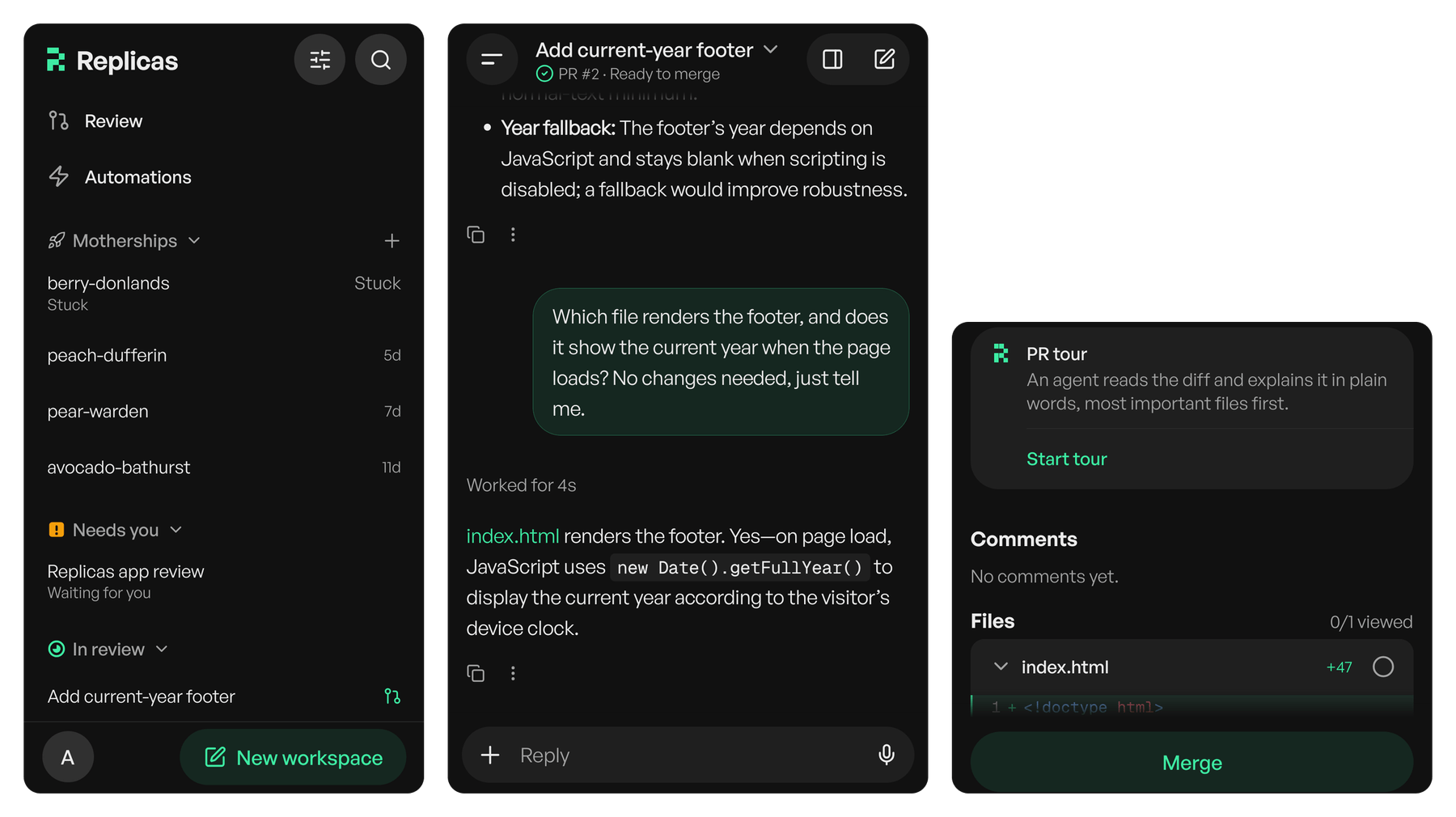
The agent never runs on the phone. Each task gets a cloud VM with your repositories and tools, and the app shows what the agent is doing and lets you reply.
| Step | What you do in the app |
|---|---|
| Start a task | Pick Claude Code, Codex, Cursor, OpenCode or Pi, then the model and effort. Type the task or dictate it. |
| Answer the agent | A notification arrives when an agent needs you, and the Needs you list shows every agent that's waiting. |
| Steer it mid-run | Send a follow-up while the agent works. It's queued and the agent picks it up without starting over. |
| Review the pull request | Start a PR tour, where an agent explains the diff file by file, and leave comments on specific lines. |
| Merge | Merge from the pull request screen when you are happy with the change. |
iOS vs Android: what's the same and what's different
Android has every feature you need to start, steer, review and merge. Four more have an Android version in the app that we haven't tested on a phone yet, and home-screen widgets are iOS only.
| Feature | Android | iOS |
|---|---|---|
| Notifications and the Needs you list | Yes | Yes |
| Voice dictation | Yes | Yes |
| Steering an agent mid-run | Yes | Yes |
| PR review tours and line comments | Yes | Yes |
| Merging pull requests | Yes | Yes |
| Model and effort per task | Yes | Yes |
| Claude Code, Codex, Cursor, OpenCode and Pi | Yes | Yes |
| Live Activities (Live Updates on Android) | Not tested yet* | Yes |
| Home-screen widgets | No | Yes |
| Sharing into the app from other apps | Not tested yet* | Yes |
| Face ID or biometric check before merging | Not tested yet* | Yes |
| Tablet layout (iPad on iOS) | Not tested yet* | Yes |
| Sign in | Google or email | Apple, Google or email |
* The Android app has a version of this; we haven't tested it on a phone.
Your workspaces, pull requests and Needs you list are the same on both, because they come from your Replicas account, so you can switch between an Android phone and an iPad without losing anything.
How we tested
We ran the Replicas 2.4.1 Android release build (package com.tryreplicas.mobile) on a cloud Android emulator, signed in to a demo account with sample data, and took the screenshots above from that run. We checked every feature in the tables against the app's source code, since the Android and iOS apps are built from the same code. We didn't test on a physical Android phone. The ChatGPT, Claude and Cursor rows come from each vendor's documentation in November 2026.
The Android app is now available on Google Play. Get Replicas for Android
FAQ