# iOS simulator and Android emulator tools for coding agents, tested
An agent ran one app task through Limrun cloud devices and five local device tools. What worked on iOS and Android, what failed, and what each needs and costs.
- Canonical: https://replicas.dev/resources/ios-simulator-android-emulator-mcp
You can give a coding agent an iPhone simulator or an Android emulator in several ways. Most are MCP servers that run on your own machine, and a few are cloud devices driven from a CLI. Their READMEs all list tap, type and screenshot, so I wanted to know what an agent could do with each one past that point.
I had an agent run the same small task through each tool: launch a one-screen app, type a name, tap a button that calls a local dev server, set the location, grant permissions, receive a notification, then read the logs and record a video. It ran from a Replicas workspace, which is a Linux VM with no Mac and no KVM, on Limrun's cloud devices. Replicas includes Limrun's `lim` CLI in every workspace.
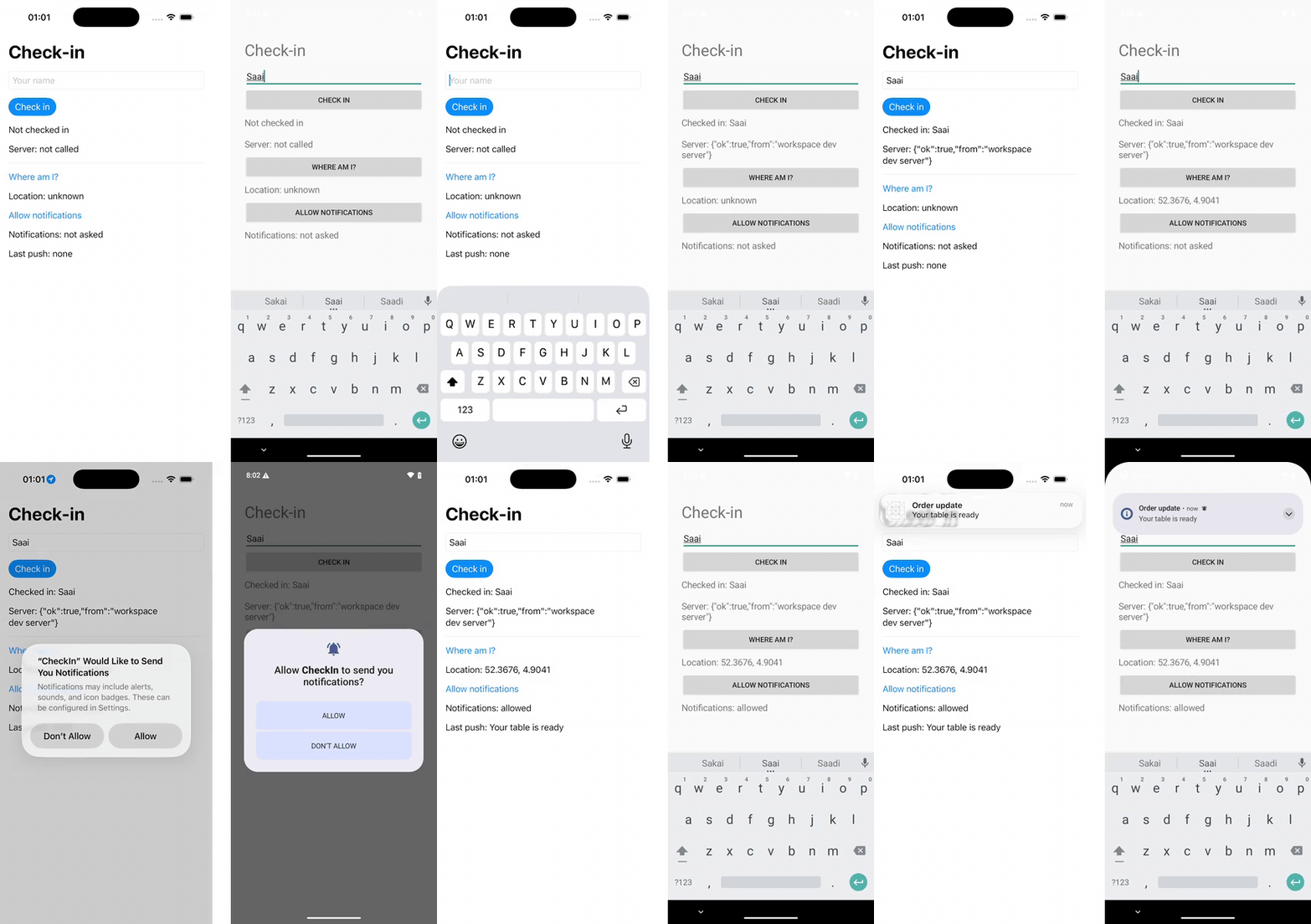 *iOS simulator on the left, driven with `lim ios`. Android emulator on the right, driven with `lim android`. Both at real speed.*
On a Mac, the free local MCP servers cover most of this list according to their docs, and nothing here replaces them for one person working on their own laptop. From a Linux machine, the cloud CLI covered all of it on iOS. On Android it covered everything except a simulated push, and its own video recording failed. The Android tools that talk to `adb` mostly worked from Linux against the cloud emulator too. The Mac-only servers installed fine on a cloud Mac, but couldn't reach a simulator there.
## The capability table
Every cell below is either something the agent ran (**tested**) or something the tool's own docs say it does (**docs**, not tested here). The column headers link to those docs. A blank cell means the tool has no command for it.
| Action | `lim` iOS | `lim` Android | [mobile-mcp](https://github.com/mobile-next/mobile-mcp#-available-mcp-tools) | [agent-device](https://oss.callstack.com/agent-device/docs/commands) | [Android-MCP](https://github.com/CursorTouch/Android-MCP#tools) | [MobileBuildMCP](https://www.mobilebuildmcp.com/docs/tools) | [ios-simulator-mcp](https://github.com/joshuayoes/ios-simulator-mcp#tools) |
|---|---|---|---|---|---|---|---|
| Install and launch an app | ✓ tested | ✓ tested | ✓ tested (launch) | ✓ tested (launch) | | ✓ docs | ✓ docs |
| Tap and type | ✓ tested | ✓ tested | ✓ tested | ✓ tested | ✓ tested (tap) | ✓ docs | ✓ docs |
| Read the element tree | ✓ tested | ✓ tested | ✓ tested | ✓ tested | ✓ tested | ✓ docs | ✓ docs |
| Screenshot | ✓ tested | ✓ tested | ✓ tested | ✓ tested | ✓ docs | ✓ docs | ✓ docs |
| Record video | ✓ tested | ✗ failed | ✓ tested | ✓ tested | | ✓ docs | ✓ docs |
| App logs, syslog or logcat | ✓ tested | ✓ tested | ✓ tested | ✓ tested | | ✓ docs | |
| Set location | ✓ tested (`simctl`) | ✓ tested (shell) | ✓ tested | ✗ refused | | ✓ docs | |
| Grant permissions | ✓ tested (`simctl`) | ✓ tested (shell) | | ✓ tested | | | |
| Simulated push | ✓ tested (`simctl`) | | | ✓ docs | | | |
| Reach a local dev server | ✓ tested (tunnel) | ✓ tested (tunnel) | n/a | n/a | n/a | n/a | n/a |
The local tools in the Android columns were tested on Android only, against the cloud emulator over `adb`. mobile-mcp and agent-device also drive iOS simulators, but only on a Mac. The two Mac-only servers were tried on a cloud Mac and failed there for reasons covered below, so their cells come from their docs. "n/a" means the tool controls the device but leaves networking to something else. On a Mac the simulator shares the machine with your dev server, and an Android emulator reaches its host at [`10.0.2.2`](https://developer.android.com/studio/run/emulator-networking).
What each one needs and costs, as of October 24, 2026:
| Tool | Platforms | Runs on | Needs | Cost |
|---|---|---|---|---|
| [Limrun](https://docs.limrun.com/docs/agents/cli) (`lim` CLI) | iOS simulators, Android emulators | Limrun's cloud; the CLI runs on Linux, macOS or Windows | A Limrun account (built into Replicas) | [$0.08/min iOS, $0.04/min Android](https://limrun.com/pricing) |
| [mobile-mcp](https://github.com/mobile-next/mobile-mcp) | iOS and Android: simulators, emulators, real devices | Your machine | Node 20+, Xcode tools for iOS, Android platform tools for Android | Free, Apache-2.0 |
| [agent-device](https://github.com/callstack/agent-device) | iOS, Android, plus TV, macOS and web | Your machine, or a [device cloud](https://oss.callstack.com/agent-device/docs/device-clouds) (Limrun is one) | Node 22.12+, macOS for iOS, `adb` for Android | Free, MIT |
| [Android-MCP](https://github.com/CursorTouch/Android-MCP) | Android | Your machine | Python 3.13, `adb` | Free, MIT |
| [MobileBuildMCP](https://github.com/getsentry/MobileBuildMCP) | iOS, macOS | Your Mac | [macOS 14.5+, Xcode 16+](https://www.mobilebuildmcp.com/docs/installation) | Free, MIT |
| [ios-simulator-mcp](https://github.com/joshuayoes/ios-simulator-mcp) | iOS simulator | Your Mac | macOS, Xcode, Node 20+, Facebook [idb](https://fbidb.io/docs/installation) | Free, MIT |
Limrun's rates are for the credits included in its paid plans, which start at $20/mo. Usage past those credits costs more, and new accounts get 120 free credits. Mobile Next, which makes mobile-mcp, also sells a [real-device cloud](https://mobilenext.ai/cloud) with plans from $0 to $299/mo, plus custom ones.
MobileBuildMCP is XcodeBuildMCP under a new name. Sentry renamed it in [v2.7.1](https://github.com/getsentry/MobileBuildMCP/releases/tag/v2.7.1), and the old GitHub URL redirects.
The local servers don't include a device. iOS simulators need [Xcode, which needs a Mac](https://developer.apple.com/documentation/xcode/running-your-app-in-simulator-or-on-a-device). A local Android emulator needs [hardware acceleration](https://developer.android.com/studio/run/emulator-acceleration), which on Linux means KVM, and the workspace these tests ran in has no `/dev/kvm`.
## The iOS run with `lim`
The test app is a 100-line SwiftUI screen with a text field, a "Check in" button that calls `http://localhost:4321/api/status`, a location button and a notifications button. `lim xcode build` built it on a cloud Mac in 10 seconds, and attaching a simulator installed and launched it in 2 more.
```bash
lim xcode build . --scheme CheckIn --configuration Debug
lim ios create --attach
lim ios tunnel --selector localhost:4321 --detach
```
The agent found elements by accessibility ID, then tapped and typed:
```bash
lim ios element-tree
lim ios tap-element --ax-unique-id name-field
lim ios type "Saai"
lim ios tap-element --ax-unique-id checkin-button
```
The request reached a server running in the Linux workspace, and the server logged the app's own user agent, `CheckIn/1 CFNetwork/3860.500.112 Darwin/25.6.0`.
Location, permissions and push have no dedicated `lim` commands. `lim ios simctl` passes arguments to the simulator's `simctl`, and that covered all three:
```bash
lim ios simctl -- privacy booted grant location dev.replicas.checkin
lim ios simctl -- location booted set 52.3676,4.9041
lim ios push-file push.apns push.apns
lim ios simctl -- push booted dev.replicas.checkin
```
Granting location ahead of time meant no permission prompt appeared. For notifications the agent let the prompt show, then tapped "Allow" with `tap-element --ax-label Allow`. The push showed up as a banner and in the app. Piping the payload into `simctl push` over stdin failed with a format error, so it has to be a file on the simulator.
There are two log commands. `lim ios app-log` returned the app's `print()` output but not its `os.Logger` lines. Those were in `lim ios syslog`, which streams until you stop it. The skill that ships with `lim` describes a snapshot mode for `syslog`, but version 0.47.0 of the CLI only streams.
## The Android run with `lim`
The Android version of the app is about 120 lines of Java. Limrun's cloud Gradle builder isn't available in Replicas workspaces, so the agent installed JDK 17 and the Android command-line tools and built the APK in the workspace. It took 26 seconds. A new emulator was ready in under a second, and sending it the 12 KB APK took 2.4 seconds.
```bash
lim android create --no-open --no-connect
lim android tunnel --selector localhost:4321 --detach
lim android install-app app-debug.apk
lim android launch-app dev.replicas.checkin --detach
lim android type "Saai" --resource-id dev.replicas.checkin:id/name_field
lim android tap-element --resource-id dev.replicas.checkin:id/checkin_button
```
Location and permissions went through `lim android adb-shell`, using Android's own commands:
```bash
lim android adb-shell -- pm grant dev.replicas.checkin android.permission.ACCESS_FINE_LOCATION
lim android adb-shell -- sh -c "appops set com.android.shell android:mock_location allow; \
cmd location providers add-test-provider gps; \
cmd location providers set-test-provider-enabled gps true; \
cmd location providers set-test-provider-location gps --location 52.3676,4.9041"
```
The test provider failed until the `appops` line allowed the shell to mock locations. Before that, the app reported the emulator's default location, 37.4220, -122.0841.
Two things didn't work:
- **Video.** `lim android record start` timed out with `Request startRecordingSession timed out` on three emulators in two regions. The iOS recorder worked on the first try. Android's own `screenrecord`, run through `adb` over `lim android connect`, worked every time, and the GIF above came from it.
- **Push.** There is no Android version of `simctl push`. The app posted its own notification and `cmd notification post` posted one from the shell, but neither goes through a push service. The emulator has Google Play services installed, so a real Firebase push may work. It wasn't tested.
For logs, `lim android app-log` returned the app's logcat lines, and `adb logcat` worked over the tunnel too.
## Local Android tools on a cloud emulator
`lim android connect` opens an `adb` tunnel and prints a serial like `127.0.0.1:38227`. Any tool that talks to `adb` sees that as a connected device, so the agent pointed three Android tools at the cloud emulator from the Linux workspace. It drove mobile-mcp and Android-MCP over MCP, and agent-device through its CLI, which [runs the same commands](https://github.com/callstack/agent-device#add-mcp-tools-to-your-agent) as its MCP server.
**mobile-mcp** listed it as `limdroid_x86_64_only`, Android 15, type "real". Taps and typing returned in about 0.2 seconds each. `mobile_set_location` moved the app to Tokyo with no shell commands. Its log tool collects lines written while the call is open, so lines from before the call didn't come back. It also refused to write screenshots and recordings anywhere but `/tmp` and its working directory.
*iOS simulator on the left, driven with `lim ios`. Android emulator on the right, driven with `lim android`. Both at real speed.*
On a Mac, the free local MCP servers cover most of this list according to their docs, and nothing here replaces them for one person working on their own laptop. From a Linux machine, the cloud CLI covered all of it on iOS. On Android it covered everything except a simulated push, and its own video recording failed. The Android tools that talk to `adb` mostly worked from Linux against the cloud emulator too. The Mac-only servers installed fine on a cloud Mac, but couldn't reach a simulator there.
## The capability table
Every cell below is either something the agent ran (**tested**) or something the tool's own docs say it does (**docs**, not tested here). The column headers link to those docs. A blank cell means the tool has no command for it.
| Action | `lim` iOS | `lim` Android | [mobile-mcp](https://github.com/mobile-next/mobile-mcp#-available-mcp-tools) | [agent-device](https://oss.callstack.com/agent-device/docs/commands) | [Android-MCP](https://github.com/CursorTouch/Android-MCP#tools) | [MobileBuildMCP](https://www.mobilebuildmcp.com/docs/tools) | [ios-simulator-mcp](https://github.com/joshuayoes/ios-simulator-mcp#tools) |
|---|---|---|---|---|---|---|---|
| Install and launch an app | ✓ tested | ✓ tested | ✓ tested (launch) | ✓ tested (launch) | | ✓ docs | ✓ docs |
| Tap and type | ✓ tested | ✓ tested | ✓ tested | ✓ tested | ✓ tested (tap) | ✓ docs | ✓ docs |
| Read the element tree | ✓ tested | ✓ tested | ✓ tested | ✓ tested | ✓ tested | ✓ docs | ✓ docs |
| Screenshot | ✓ tested | ✓ tested | ✓ tested | ✓ tested | ✓ docs | ✓ docs | ✓ docs |
| Record video | ✓ tested | ✗ failed | ✓ tested | ✓ tested | | ✓ docs | ✓ docs |
| App logs, syslog or logcat | ✓ tested | ✓ tested | ✓ tested | ✓ tested | | ✓ docs | |
| Set location | ✓ tested (`simctl`) | ✓ tested (shell) | ✓ tested | ✗ refused | | ✓ docs | |
| Grant permissions | ✓ tested (`simctl`) | ✓ tested (shell) | | ✓ tested | | | |
| Simulated push | ✓ tested (`simctl`) | | | ✓ docs | | | |
| Reach a local dev server | ✓ tested (tunnel) | ✓ tested (tunnel) | n/a | n/a | n/a | n/a | n/a |
The local tools in the Android columns were tested on Android only, against the cloud emulator over `adb`. mobile-mcp and agent-device also drive iOS simulators, but only on a Mac. The two Mac-only servers were tried on a cloud Mac and failed there for reasons covered below, so their cells come from their docs. "n/a" means the tool controls the device but leaves networking to something else. On a Mac the simulator shares the machine with your dev server, and an Android emulator reaches its host at [`10.0.2.2`](https://developer.android.com/studio/run/emulator-networking).
What each one needs and costs, as of October 24, 2026:
| Tool | Platforms | Runs on | Needs | Cost |
|---|---|---|---|---|
| [Limrun](https://docs.limrun.com/docs/agents/cli) (`lim` CLI) | iOS simulators, Android emulators | Limrun's cloud; the CLI runs on Linux, macOS or Windows | A Limrun account (built into Replicas) | [$0.08/min iOS, $0.04/min Android](https://limrun.com/pricing) |
| [mobile-mcp](https://github.com/mobile-next/mobile-mcp) | iOS and Android: simulators, emulators, real devices | Your machine | Node 20+, Xcode tools for iOS, Android platform tools for Android | Free, Apache-2.0 |
| [agent-device](https://github.com/callstack/agent-device) | iOS, Android, plus TV, macOS and web | Your machine, or a [device cloud](https://oss.callstack.com/agent-device/docs/device-clouds) (Limrun is one) | Node 22.12+, macOS for iOS, `adb` for Android | Free, MIT |
| [Android-MCP](https://github.com/CursorTouch/Android-MCP) | Android | Your machine | Python 3.13, `adb` | Free, MIT |
| [MobileBuildMCP](https://github.com/getsentry/MobileBuildMCP) | iOS, macOS | Your Mac | [macOS 14.5+, Xcode 16+](https://www.mobilebuildmcp.com/docs/installation) | Free, MIT |
| [ios-simulator-mcp](https://github.com/joshuayoes/ios-simulator-mcp) | iOS simulator | Your Mac | macOS, Xcode, Node 20+, Facebook [idb](https://fbidb.io/docs/installation) | Free, MIT |
Limrun's rates are for the credits included in its paid plans, which start at $20/mo. Usage past those credits costs more, and new accounts get 120 free credits. Mobile Next, which makes mobile-mcp, also sells a [real-device cloud](https://mobilenext.ai/cloud) with plans from $0 to $299/mo, plus custom ones.
MobileBuildMCP is XcodeBuildMCP under a new name. Sentry renamed it in [v2.7.1](https://github.com/getsentry/MobileBuildMCP/releases/tag/v2.7.1), and the old GitHub URL redirects.
The local servers don't include a device. iOS simulators need [Xcode, which needs a Mac](https://developer.apple.com/documentation/xcode/running-your-app-in-simulator-or-on-a-device). A local Android emulator needs [hardware acceleration](https://developer.android.com/studio/run/emulator-acceleration), which on Linux means KVM, and the workspace these tests ran in has no `/dev/kvm`.
## The iOS run with `lim`
The test app is a 100-line SwiftUI screen with a text field, a "Check in" button that calls `http://localhost:4321/api/status`, a location button and a notifications button. `lim xcode build` built it on a cloud Mac in 10 seconds, and attaching a simulator installed and launched it in 2 more.
```bash
lim xcode build . --scheme CheckIn --configuration Debug
lim ios create --attach
lim ios tunnel --selector localhost:4321 --detach
```
The agent found elements by accessibility ID, then tapped and typed:
```bash
lim ios element-tree
lim ios tap-element --ax-unique-id name-field
lim ios type "Saai"
lim ios tap-element --ax-unique-id checkin-button
```
The request reached a server running in the Linux workspace, and the server logged the app's own user agent, `CheckIn/1 CFNetwork/3860.500.112 Darwin/25.6.0`.
Location, permissions and push have no dedicated `lim` commands. `lim ios simctl` passes arguments to the simulator's `simctl`, and that covered all three:
```bash
lim ios simctl -- privacy booted grant location dev.replicas.checkin
lim ios simctl -- location booted set 52.3676,4.9041
lim ios push-file push.apns push.apns
lim ios simctl -- push booted dev.replicas.checkin
```
Granting location ahead of time meant no permission prompt appeared. For notifications the agent let the prompt show, then tapped "Allow" with `tap-element --ax-label Allow`. The push showed up as a banner and in the app. Piping the payload into `simctl push` over stdin failed with a format error, so it has to be a file on the simulator.
There are two log commands. `lim ios app-log` returned the app's `print()` output but not its `os.Logger` lines. Those were in `lim ios syslog`, which streams until you stop it. The skill that ships with `lim` describes a snapshot mode for `syslog`, but version 0.47.0 of the CLI only streams.
## The Android run with `lim`
The Android version of the app is about 120 lines of Java. Limrun's cloud Gradle builder isn't available in Replicas workspaces, so the agent installed JDK 17 and the Android command-line tools and built the APK in the workspace. It took 26 seconds. A new emulator was ready in under a second, and sending it the 12 KB APK took 2.4 seconds.
```bash
lim android create --no-open --no-connect
lim android tunnel --selector localhost:4321 --detach
lim android install-app app-debug.apk
lim android launch-app dev.replicas.checkin --detach
lim android type "Saai" --resource-id dev.replicas.checkin:id/name_field
lim android tap-element --resource-id dev.replicas.checkin:id/checkin_button
```
Location and permissions went through `lim android adb-shell`, using Android's own commands:
```bash
lim android adb-shell -- pm grant dev.replicas.checkin android.permission.ACCESS_FINE_LOCATION
lim android adb-shell -- sh -c "appops set com.android.shell android:mock_location allow; \
cmd location providers add-test-provider gps; \
cmd location providers set-test-provider-enabled gps true; \
cmd location providers set-test-provider-location gps --location 52.3676,4.9041"
```
The test provider failed until the `appops` line allowed the shell to mock locations. Before that, the app reported the emulator's default location, 37.4220, -122.0841.
Two things didn't work:
- **Video.** `lim android record start` timed out with `Request startRecordingSession timed out` on three emulators in two regions. The iOS recorder worked on the first try. Android's own `screenrecord`, run through `adb` over `lim android connect`, worked every time, and the GIF above came from it.
- **Push.** There is no Android version of `simctl push`. The app posted its own notification and `cmd notification post` posted one from the shell, but neither goes through a push service. The emulator has Google Play services installed, so a real Firebase push may work. It wasn't tested.
For logs, `lim android app-log` returned the app's logcat lines, and `adb logcat` worked over the tunnel too.
## Local Android tools on a cloud emulator
`lim android connect` opens an `adb` tunnel and prints a serial like `127.0.0.1:38227`. Any tool that talks to `adb` sees that as a connected device, so the agent pointed three Android tools at the cloud emulator from the Linux workspace. It drove mobile-mcp and Android-MCP over MCP, and agent-device through its CLI, which [runs the same commands](https://github.com/callstack/agent-device#add-mcp-tools-to-your-agent) as its MCP server.
**mobile-mcp** listed it as `limdroid_x86_64_only`, Android 15, type "real". Taps and typing returned in about 0.2 seconds each. `mobile_set_location` moved the app to Tokyo with no shell commands. Its log tool collects lines written while the call is open, so lines from before the call didn't come back. It also refused to write screenshots and recordings anywhere but `/tmp` and its working directory.
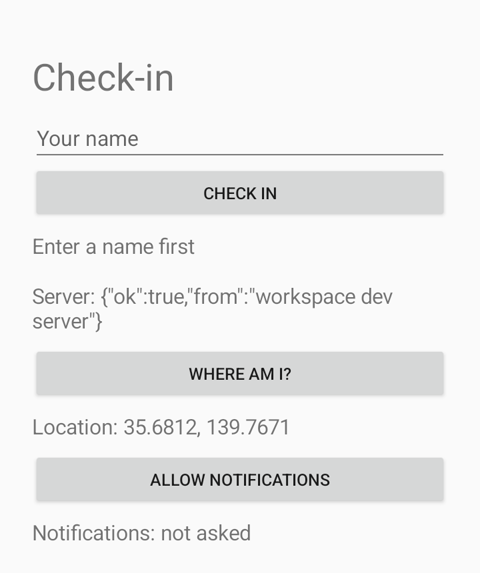 *mobile-mcp moved the emulator to Tokyo. In this run it typed right after relaunching the app, before the screen was ready, so the name never landed. The same calls a few seconds later worked.*
**agent-device** opened the app, read a snapshot of interactive elements, filled the field, pressed the button, granted permissions, captured the app's logcat lines to a file, and started and stopped a screen recording. `settings location set` refused with "Android precise location coordinates are supported only on emulators": it treats a device on a network serial as a physical phone. Its refs go stale after any change on screen, so the agent had to take a new snapshot after the keyboard opened.
**Android-MCP** listed the three buttons and the text field with tap coordinates and tapped by resource ID. It failed the first time with `uiautomator dump returned no hierarchy: 'Killed'` while agent-device's session was still open on the same emulator, and worked after that session closed.
mobile-mcp and Android-MCP stay running between calls. The `lim` CLI starts a new process for each command: a coordinate tap took about 0.55 seconds, 0.4 of which was the CLI starting up, and a tap by resource ID took about 2 seconds.
## Mac-only MCP servers on a cloud Mac
Limrun's Xcode sandboxes are Macs (macOS 26.7, Xcode 26.4), and `lim xcode run` runs a command on one. So the agent tried the two Mac-only servers there.
MobileBuildMCP 2.7.1 installed with `npm install -g mobilebuildmcp` in about 4 seconds. Its CLI found the project and its scheme, and `mobilebuildmcp device build` built the app in 5.1 seconds. Started as an MCP server with requests piped in, it answered `initialize` and listed 24 tools.
Everything that needed a simulator failed. `simulator list` failed with `Operation not permitted` from `simctl`, and `simulator build` failed with "Unable to find a device matching the provided destination specifier". `lim` prints the reason when you run a command there: "the xcode sandbox does not host simulators". Limrun's simulators are separate instances that get attached to the sandbox for installs.
ios-simulator-mcp 2.1.0 started and listed its 17 tools, then failed on the first one, `get_booted_sim_id`, with the same `simctl` error. idb isn't installed there either.
There is a second problem even for tools that would work. `lim xcode run` runs one command at a time with no stdin, so an agent can't keep an MCP session open to a server inside the sandbox. The agent only reached these servers by piping a fixed list of requests into a single command. Both are built for a Mac you're sitting at, and that's where to use them.
## Where each one fits
If you work on a Mac and your agent runs there too, start with the local servers. They're free and fast, and they drive the simulator you're already looking at. MobileBuildMCP also builds the app, runs XCTest and attaches LLDB.
Cloud devices fit when the agent isn't on a Mac. That covers agents in cloud VMs, several agents testing in parallel, and teams without enough Macs to go around. Limrun also runs a [remote MCP server](https://docs.limrun.com/docs/agents/remote-mcp) with 16 tools for creating and driving devices. It leaves builds and uploads to the CLI, and I didn't test it.
For Android you can mix them. Run mobile-mcp, agent-device or Android-MCP wherever your agent runs, and point it at a cloud emulator through `lim android connect`.
Mobile testing in Replicas has these limits, from the [mobile testing docs](https://docs.replicas.dev/features/mobile-testing):
- 3 active instances per workspace
- 3 hours at most per instance
- Simulators and emulators stop after 3 idle minutes and Xcode sandboxes after 10, adjustable up to an hour with `--inactivity-timeout`
- Instances stop when their workspace sleeps, is archived or is deleted
- Not available to organizations with a signed BAA
The idle timeout ended this run's first Xcode sandbox while the agent was working on Android. The next `lim ios create --attach` made a simulator with nothing to attach to, so it ran `lim xcode build` again to get a new sandbox, which took 11.5 seconds. Replicas [bills Limrun usage at cost](https://docs.replicas.dev/admin/billing#rates).
None of these are real phones. For a comparison of real-device clouds and a Maestro test run, see [How to test iOS and Android apps with cloud coding agents](/resources/test-mobile-apps-with-cloud-coding-agents).
To try the cloud side, [start a Replicas workspace](https://app.replicas.dev) and ask an agent to run your app on both platforms. A Mobile view shows the device while it works.
*mobile-mcp moved the emulator to Tokyo. In this run it typed right after relaunching the app, before the screen was ready, so the name never landed. The same calls a few seconds later worked.*
**agent-device** opened the app, read a snapshot of interactive elements, filled the field, pressed the button, granted permissions, captured the app's logcat lines to a file, and started and stopped a screen recording. `settings location set` refused with "Android precise location coordinates are supported only on emulators": it treats a device on a network serial as a physical phone. Its refs go stale after any change on screen, so the agent had to take a new snapshot after the keyboard opened.
**Android-MCP** listed the three buttons and the text field with tap coordinates and tapped by resource ID. It failed the first time with `uiautomator dump returned no hierarchy: 'Killed'` while agent-device's session was still open on the same emulator, and worked after that session closed.
mobile-mcp and Android-MCP stay running between calls. The `lim` CLI starts a new process for each command: a coordinate tap took about 0.55 seconds, 0.4 of which was the CLI starting up, and a tap by resource ID took about 2 seconds.
## Mac-only MCP servers on a cloud Mac
Limrun's Xcode sandboxes are Macs (macOS 26.7, Xcode 26.4), and `lim xcode run` runs a command on one. So the agent tried the two Mac-only servers there.
MobileBuildMCP 2.7.1 installed with `npm install -g mobilebuildmcp` in about 4 seconds. Its CLI found the project and its scheme, and `mobilebuildmcp device build` built the app in 5.1 seconds. Started as an MCP server with requests piped in, it answered `initialize` and listed 24 tools.
Everything that needed a simulator failed. `simulator list` failed with `Operation not permitted` from `simctl`, and `simulator build` failed with "Unable to find a device matching the provided destination specifier". `lim` prints the reason when you run a command there: "the xcode sandbox does not host simulators". Limrun's simulators are separate instances that get attached to the sandbox for installs.
ios-simulator-mcp 2.1.0 started and listed its 17 tools, then failed on the first one, `get_booted_sim_id`, with the same `simctl` error. idb isn't installed there either.
There is a second problem even for tools that would work. `lim xcode run` runs one command at a time with no stdin, so an agent can't keep an MCP session open to a server inside the sandbox. The agent only reached these servers by piping a fixed list of requests into a single command. Both are built for a Mac you're sitting at, and that's where to use them.
## Where each one fits
If you work on a Mac and your agent runs there too, start with the local servers. They're free and fast, and they drive the simulator you're already looking at. MobileBuildMCP also builds the app, runs XCTest and attaches LLDB.
Cloud devices fit when the agent isn't on a Mac. That covers agents in cloud VMs, several agents testing in parallel, and teams without enough Macs to go around. Limrun also runs a [remote MCP server](https://docs.limrun.com/docs/agents/remote-mcp) with 16 tools for creating and driving devices. It leaves builds and uploads to the CLI, and I didn't test it.
For Android you can mix them. Run mobile-mcp, agent-device or Android-MCP wherever your agent runs, and point it at a cloud emulator through `lim android connect`.
Mobile testing in Replicas has these limits, from the [mobile testing docs](https://docs.replicas.dev/features/mobile-testing):
- 3 active instances per workspace
- 3 hours at most per instance
- Simulators and emulators stop after 3 idle minutes and Xcode sandboxes after 10, adjustable up to an hour with `--inactivity-timeout`
- Instances stop when their workspace sleeps, is archived or is deleted
- Not available to organizations with a signed BAA
The idle timeout ended this run's first Xcode sandbox while the agent was working on Android. The next `lim ios create --attach` made a simulator with nothing to attach to, so it ran `lim xcode build` again to get a new sandbox, which took 11.5 seconds. Replicas [bills Limrun usage at cost](https://docs.replicas.dev/admin/billing#rates).
None of these are real phones. For a comparison of real-device clouds and a Maestro test run, see [How to test iOS and Android apps with cloud coding agents](/resources/test-mobile-apps-with-cloud-coding-agents).
To try the cloud side, [start a Replicas workspace](https://app.replicas.dev) and ask an agent to run your app on both platforms. A Mobile view shows the device while it works.